
In this article, we will walk step by step through how to check if proxies are working using our proxy checker, and we will also answer what to do if your proxy turns out to be non-working.
1. Open the proxy checker
First, open the proxy checker using the following link: https://checker.caproxy.com/
2. Enter proxy details
Select the testing protocol and enter the required data into the corresponding fields, specifically:
- IP address or hostname (both formats are supported)
- Port
- Login (optional)
- Password (optional)
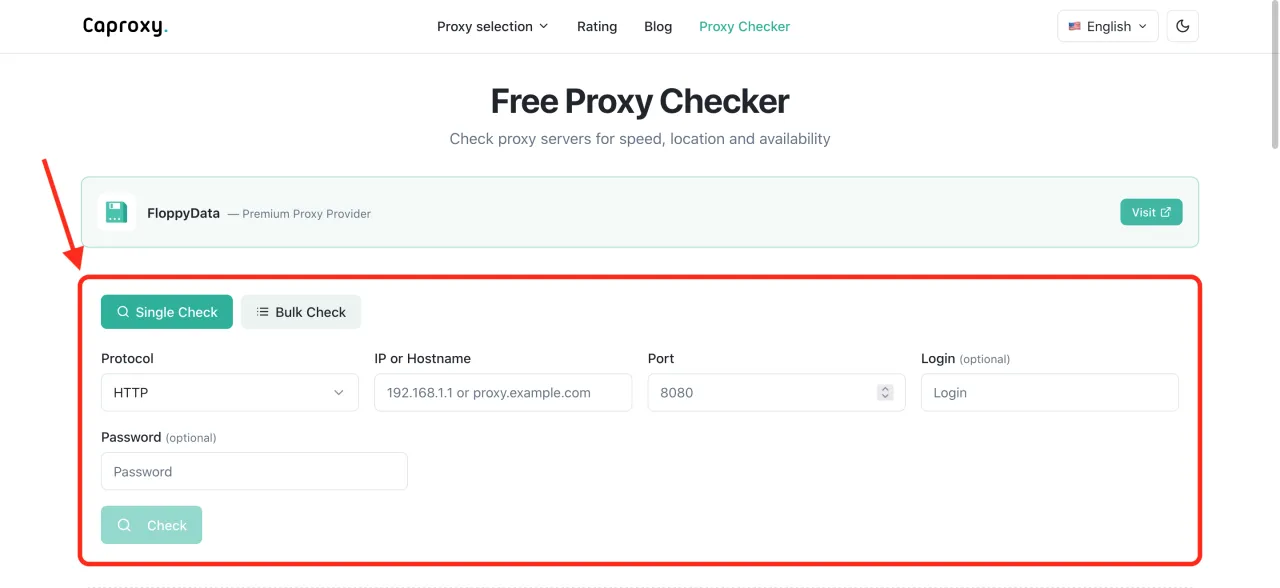
Also, if you have copied all proxy data in a single line or need to run a bulk check, click “Bulk Check” and enter the required values. The following formats are supported:
- IP:PORT
- IP:PORT:LOGIN:PASSWORD
- LOGIN:PASSWORD@IP:PORT
3. View the test results
After entering the data, click the “Check” button and the website will start testing your proxies. This is how the results will look.
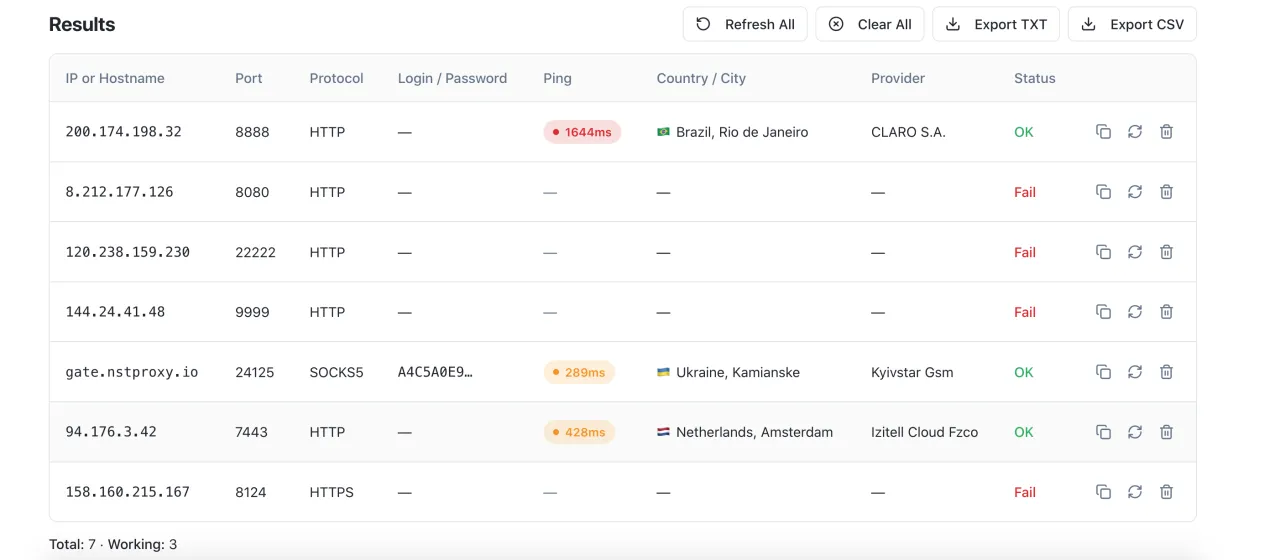 Once the results table appears, you will be able to see proxy latency, country, and provider. If proxies are not working, you will not see any data and the status will be “Fail”.
You can also export the table in CSV or TXT format, clear the table, or refresh test results for all proxies. In addition to bulk actions, you can individually refresh, copy, or delete proxies.
What should you do if proxies are not working?
If you constantly see the “Fail” status during testing, it means the system detects the proxies as non-working, and you should do the following:
-
Check if the entered data is correct. Even a small typo or an extra copied character can cause a connection error.
-
Check the proxies again. Sometimes proxies may fail to connect on the first attempt, especially if they are free or residential proxies, so test them multiple times.
If steps 1 and 2 do not solve the issue:
-
If you are testing free proxies, in most cases they will be non-working or frequently disconnect. Free proxies are very low quality and we do not recommend using them. You will spend more time searching for them, and even if you find working ones, they will most likely stop working after a short period of time. Since free proxies are typically server-based and inexpensive, it is better to spend a few dollars per month to purchase proxies from Proxy-Seller rather than struggling with free proxies.
-
If you are testing proxies purchased from a proxy provider, you should contact their support team and report that they provided non-working proxies. The provider will recheck and replace them with working ones.
Also, if the system shows that proxies are working but they do not work when connecting on your device, it means they are configured incorrectly on your device or something is blocking them from working properly. If these are free proxies, they may be extremely unstable and work inconsistently.
Tip 1: If you are not sure which proxies to choose for your goals, check out our article: Proxy types: how to choose the right one.
Tip 2: If you need proxies from a specific country or a full list of proxy providers, check this information: Proxy provider rating
FAQ
- How to check if proxies are working?
- Use our proxy checker for this: https://checker.caproxy.com/
- What is a proxy checker?
- It is a tool for testing proxies that allows you to check in advance whether your proxies are working and also rule out issues with your connection device.
- Is it free?
- Yes, the proxy checker is completely free.
- Why are the proxies not working?
- Check if the entered data is correct — you may have made a mistake. If there are no errors, the reason may be that you are using free proxies or the proxy provider sold you non-working proxies.
- What should I do if the proxies are not working?
- If you are using free proxies, we recommend purchasing them, for example from Proxy-Seller, or if you already have paid proxies, contact your proxy provider’s support team.
- Is it possible to check multiple proxies at once?
- Yes, our tool supports bulk proxy checking.











Олег
2026-02-19A simple and convenient checker. The most user-friendly one I’ve used recently—thank you!
Reply