Last updated: 2026-03-26
In this article, we will take a deep dive into multi-accounting and break down all the aspects and nuances that will help you work efficiently. We will also take a detailed look at which industries use multi-accounting, the key tools required for it, as well as go over common mistakes and provide a step-by-step guide.
A bit about us: We are the team behind the proxy provider aggregator Caproxy, which specializes in proxies, including proxy provider reviews, articles about proxies, and related topics where proxies are активно used in practice. After studying information about multi-accounting, we were surprised by how many mistakes other authors make when publishing articles on this topic, especially when it comes to proxies, or how superficially they cover the subject without addressing key aspects.
That’s why it’s not surprising that your accounts get banned when other authors recommend using "IPv4 proxies" or fail to explain details about WebRTC, and so on. Let’s dive into the details.
What is multi-accounting?
Multi-accounting is the creation of two or more accounts on the same platform by a single user. It is used across many industries such as traffic arbitrage, cryptocurrency, SMM, marketing, e-commerce, and more.
The main goal of multi-accounting is to scale operations and generate additional profit from multiple accounts at once. However, the challenge is that most target services prohibit multi-accounting, so it’s important not only to create multiple profiles but also to remain undetected by anti-fraud systems to avoid getting banned.
Where is multi-accounting used?
In practice, it is used in any field where there is a need to create multiple accounts. Let’s go over the main areas.
-
Marketing and SMM. On social media platforms (Facebook, Instagram, TikTok, VKontakte, etc.), multi-accounting is used to manage multiple profiles, scale ad campaigns, and drive promotion. Multi-accounts are also used for "farming" followers or engagement. For example, one owner may create dozens of fake profiles that like, comment, and follow a specific page to simulate a "real" audience, thereby improving behavioral metrics.
-
Traffic arbitrage. In online advertising and affiliate programs, multi-accounts allow testing different approaches and generating leads. For example, an arbitrage specialist may create multiple accounts in ad platforms (such as Google Ads or Facebook Ads) to run parallel campaigns for different geos or niche segments. This helps evaluate the viability of each approach and quickly scale the winning combinations.
-
E-commerce. On marketplaces (eBay, Amazon, etc.), multi-accounting can be used to scale sales and manage reputation. Multiple accounts make it possible to sell more products by bypassing limits on listings or daily turnover within a single profile. They can also be used to leave self-reviews or lower competitors’ ratings, which we do not recommend, as we support fair competition.
-
Cryptocurrencies and blockchain projects. In the crypto startup space, multi-accounts have become very popular for airdrops, testnets, lotteries, and whitelist sales. New projects distribute tokens or bonuses to early users. For example, if one account brings 100 tokens, then 100 accounts bring 100× more profit. That’s why enthusiasts create entire "crypto farms" with hundreds of wallets and exchange accounts to participate in promotions multiple times. Similarly, multi-accounts are used to receive welcome bonuses or referral discounts from exchanges.
-
Betting and gambling. Bookmakers and online casinos offer bonuses to new players (free bets, free spins). As a result, bonus hunters create second and third accounts to maximize their gains.
-
Testing and QA. Multi-accounts are also used for testing purposes: QA engineers create "test" accounts to check new features under different user roles or subscription plans. For example, to simulate multiple users on a platform, teams may create several accounts with different permission levels. This is a legitimate use case and is usually done in testing environments rather than live production systems.
-
Additional areas. Multi-accounting is also used in recruiting (creating multiple fake candidates for testing), data collection (scraping websites tied to different accounts), PR (boosting likes/reposts), and more. Any field where a platform limits actions per account can be "worked around" using tools that we will discuss below.
Is multi-accounting legal?
Multi-accounting itself is generally not illegal, but we recommend reviewing local laws, as they may vary by country.
However, it’s important to understand that multi-accounting often violates platform rules. For example, bookmakers usually enforce a "one player – one account" policy, and registering multiple profiles by one person is considered a violation of the user agreement. Typically, violating the terms of service results in account suspension, without additional legal consequences.
As mentioned earlier, multi-accounting itself is not illegal, but if its purpose is fraud, that’s a different story. In other words, if multi-accounting is used for fraudulent activities, it becomes a legal violation (e.g., fraud, money laundering, etc.) and may lead to criminal liability. A simple example: in 2018, a British man was sentenced to 15 months in prison for creating over 1,000 fake accounts on Bet365 and illegally obtaining £236,000.
To sum up: Multi-accounting itself does not violate the law, but your actions carried out through multi-accounting may be illegal if they are fraudulent in nature. Always review local laws and platform terms of service before engaging in multi-accounting so you understand all the risks.
Disclaimer: We do not support any illegal activities carried out through multi-accounting. We encourage you to act honestly and use multi-accounting only for lawful purposes that do not violate laws or platform terms of service.
Tools for Multi-Accounting
Now let’s talk about the technical side of multi-accounting. The main goal is to stay undetected by anti-fraud systems, and for that we rely on two essential tools:
-
Proxies. Used to assign a unique IP address to each account
-
Anti-detect browser. Used to create a unique digital fingerprint
Without these two tools, multi-accounting doesn’t make sense, since modern anti-fraud systems are quite advanced. For example, if you only change the IP address for each account, you can still be detected due to identical behavior patterns and the same digital fingerprint (User-Agent, WebGL, Canvas, etc.). That’s why the combination of proxies + an anti-detect browser is essential.
It’s also important to keep in mind that if your setup requires email/phone number/bank card/wallet, they must all be unique for each account. While emails and wallets are easy to create, mobile numbers and bank cards can be more challenging. For that, there are virtual phone numbers and virtual bank cards, which can be purchased from CyberYozh.
Let’s take a closer look at the technical aspects, because this is where most mistakes happen.
Proxies
If someone recommends "IPv4 proxies" , "SOCKS5 proxies" or "rotating proxies" for multi-accounting without explaining the details, feel free to close that article. Choosing the wrong proxy can quickly get your account banned, so to work effectively with multi-accounting, you need to understand proxy details, and we’ll help you with that.
A proxy itself is a simple tool, it just lets you change your IP address. But choosing the right proxy is more complex, since there are many types and subtypes. For example, when providers advertise IPv4 proxies, they often mean regular datacenter proxies, which contradict the logic of multi-accounting and can easily get you flagged by anti-fraud systems.
The reason is that anti-fraud systems don’t just see your IP address, they see all associated data, including its ASN (which network it belongs to), the end owner of the IP address, and whether it has been flagged in spam databases.
Now, based on this, let’s break down the four main types of proxies:
-
Static datacenter proxies. These are IP addresses originally owned by data centers. In simple terms, they are commercial IPs that clearly do not belong to real users, which can raise suspicion with anti-fraud systems. They are often referred to as "IPv4 proxies" or "SOCKS5 proxies", although that’s not entirely accurate, since those are just protocols and apply to other proxy types as well. We do not recommend using these proxies for multi-accounting.
-
Static ISP proxies. These are IP addresses from real internet service providers, but resold through data centers. They are often called "static residential proxies". Overall, they work well for multi-accounting, although advanced anti-fraud systems may still detect that they ultimately belong to a company for commercial use.
-
Rotating residential proxies. These use IP addresses assigned to real users, but unlike the previous types, the IP is not static. The challenge is that frequent IP changes can raise suspicion, since home users typically have relatively stable IPs. These proxies can work well for multi-accounting, but with some caveats.
-
Dedicated mobile proxies. These use IP addresses from mobile carriers. They are quite специфические, since you can run multiple accounts on a single proxy (we’ll cover this later). Mobile proxies are considered the best option for multi-accounting, but they are expensive, so they’re not suitable for every case.
So, we’ve covered proxy types, but haven’t answered the key question: which proxy type should you choose for multi-accounting? The issue is that the choice heavily depends on the target website, your goals, the number of accounts, as well as how long and how frequently you plan to use them. For example, if you need two social media accounts with regular activity, we would recommend ISP proxies. But if you need 100 accounts for low-activity airdrops, then rotating residential proxies with sticky sessions would be a better choice.
To better understand which proxy fits your needs, let’s look at the table:
| Proxy type | When to choose | Best use cases | Cost | Billing model | Key features |
| Static datacenter proxies | On websites with low anti-fraud protection | Testing and QA | ~$1.80 | Per IP | Since these proxies are clearly identified as commercial, they are best used for internal products, testing, or low-security websites. Due to their low cost, they can also be used to test whether a target site blocks such proxies — but only if you’re willing to risk losing accounts. |
| Static ISP proxies | For accounts with consistent long-term activity | SMM and social activity, e-commerce, cryptocurrency, betting | ~$3.00 | Per IP | Great for stable, long-term usage since the IP remains the same. However, scaling to 50+ accounts can get expensive, so residential or mobile proxies may be a better option. Also, anti-fraud systems may still detect that the IP ultimately belongs to a data center, which can raise suspicion. |
| Rotating residential proxies | For accounts with irregular or short-term activity. Also good for farming | Cryptocurrency, marketing, betting | ~$2.50 | Per GB | Provide excellent IP masking and appear as real users. The downside is IP rotation, which can raise suspicion. That’s why it’s important to use sticky sessions so the IP remains the same as long as possible. Also, configure detailed targeting by city and ISP to avoid sudden location jumps. |
| Dedicated mobile proxies | For any use case where account safety is critical, especially for long-term use. Also good for farming | Arbitrage, cryptocurrency, marketing, betting | ~$65.00 | Per endpoint | With mobile proxies, you pay per endpoint. You get a static IP that you can change on demand. This means you can run even hundreds of accounts on a single proxy, but you must change the IP when switching between accounts. Since IP rotation is normal for mobile networks and many users share the same IP, anti-fraud systems are very tolerant of mobile IPs. |
There are many variables when choosing proxies, so it’s impossible to give a one-size-fits-all answer. However, with the information in this article, you should be able to make the right decision based on your specific needs.
Cost efficiency is also an important factor. For example, if you need to manage 100 accounts with low or infrequent activity, rotating residential proxies are a better option. Using ISP proxies would cost you around $300 per month, whereas if each account uses about 100 MB per month, rotating proxies for 100 accounts would cost roughly $25 per month. So your choice of proxy heavily depends on the number of accounts and how often and how long you plan to use them.
Where to get proxies?
Among providers that offer all types of proxies, we can recommend Proxy-Seller and CyberYozh. You’ll also find promo codes for them below.


You can also find a suitable proxy provider using our proxy provider ranking, which includes a convenient filter — especially useful if you need proxies with IPs from a specific country.
By the way, SOCKS5 is typically preferred for anti-detect browsers, but HTTP(S) works as well.
Anti-detect Browser
Now let’s move on to anti-detect browsers. With an anti-detect browser, you can create a new digital fingerprint so that anti-fraud systems can’t detect you. Imagine multiple identical actions being performed on a platform by devices with the same characteristics (operating system, browser version, fonts, and so on). Based on these signals, anti-fraud systems can easily link accounts together, and you’ll get banned, even if your IP addresses are different.
Don’t forget that our main goal is to look like real users, and those users should not look alike. That’s where anti-detect browsers come in, as they modify the user’s digital fingerprint.
To understand how anti-detect browsers work, let’s take Dolphy{anty} as an example. In our opinion, it’s one of the most convenient and feature-rich browsers, and it also offers 5 free profiles for testing. When registering, you can use the promo code MYRATING to get a 20% discount on your future purchase if you need more profiles.
You can also check out other browsers in our article: 10 best anti-detect browsers for multi-accounting.
To better understand what an anti-detect browser does and what a fingerprint is, let’s take a look at the settings when creating a profile.
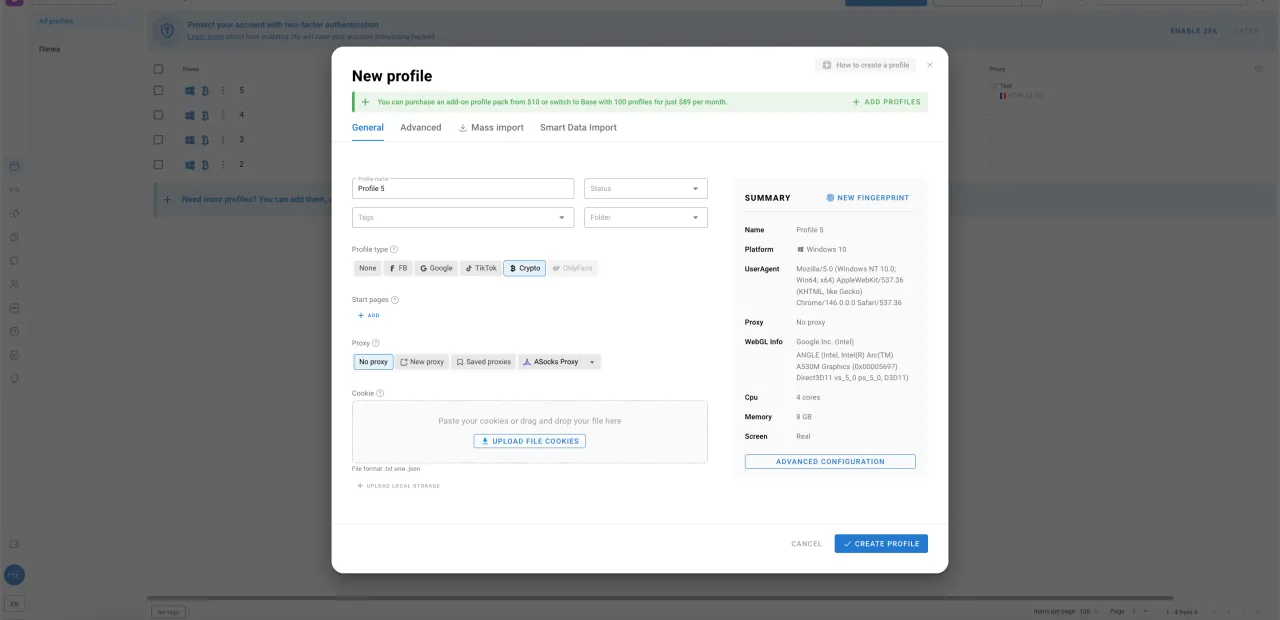
By default, you’ll see general settings where you need to specify all the required information, while the fingerprint is generated automatically. You can also regenerate it if needed.
At this stage, you must add a proxy. Optionally, you can also add tags, set a profile status, place it into a folder, define startup pages that should open, or upload a cookie file.
Overall, we’ve tested how fingerprints are generated in Dolphy and can say that no additional manual configuration is required. Moreover, Dolphy replaces your WebRTC IP with your proxy IP, which is a very useful feature. The timezone and language are also automatically adjusted based on your proxy IP, which is very convenient. If you don’t have the time or expertise to fine-tune fingerprint settings, you can safely rely on automatic generation, as it’s implemented very well in Dolphy.
Below, you can see screenshots with the full list of advanced features.
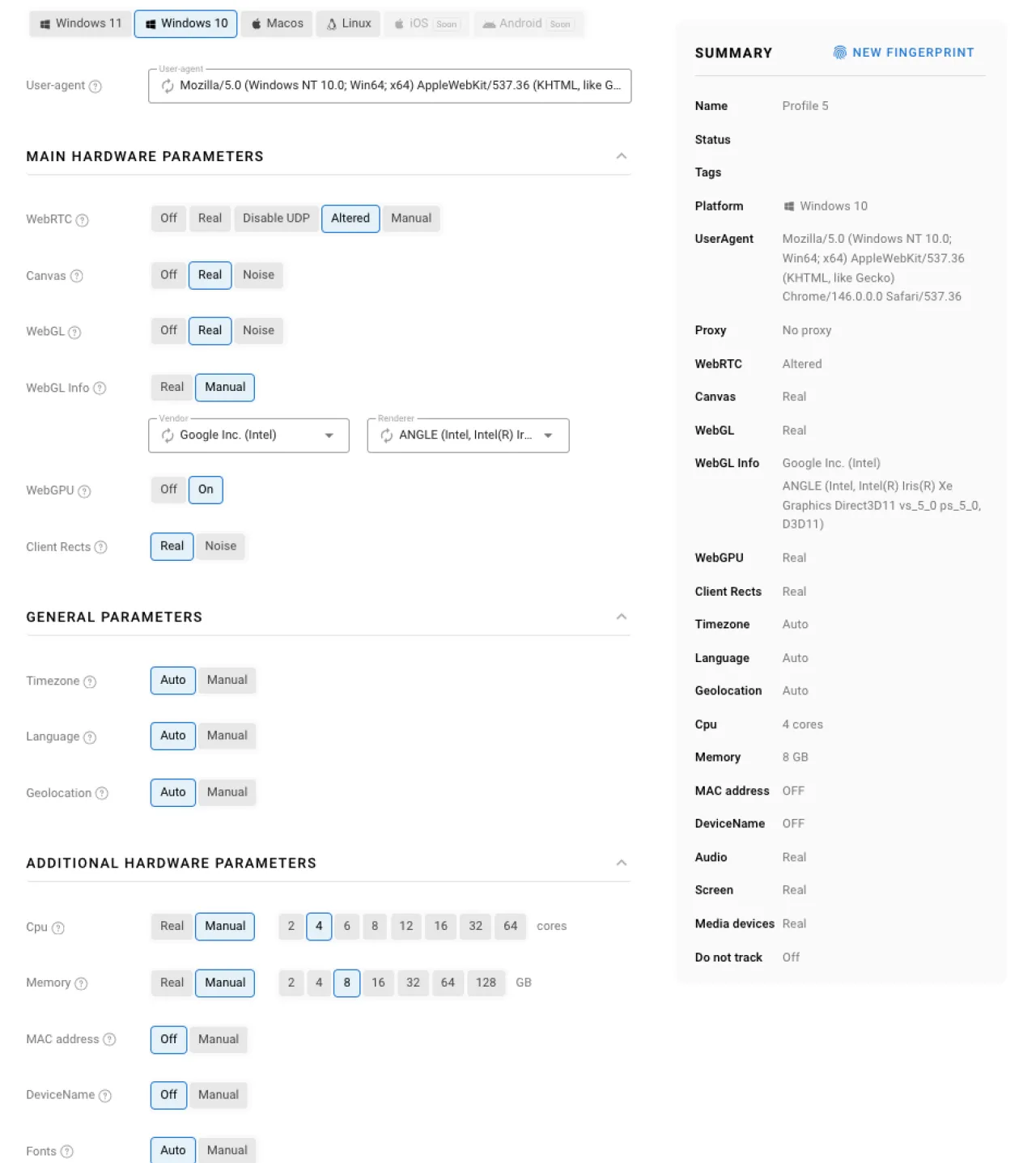
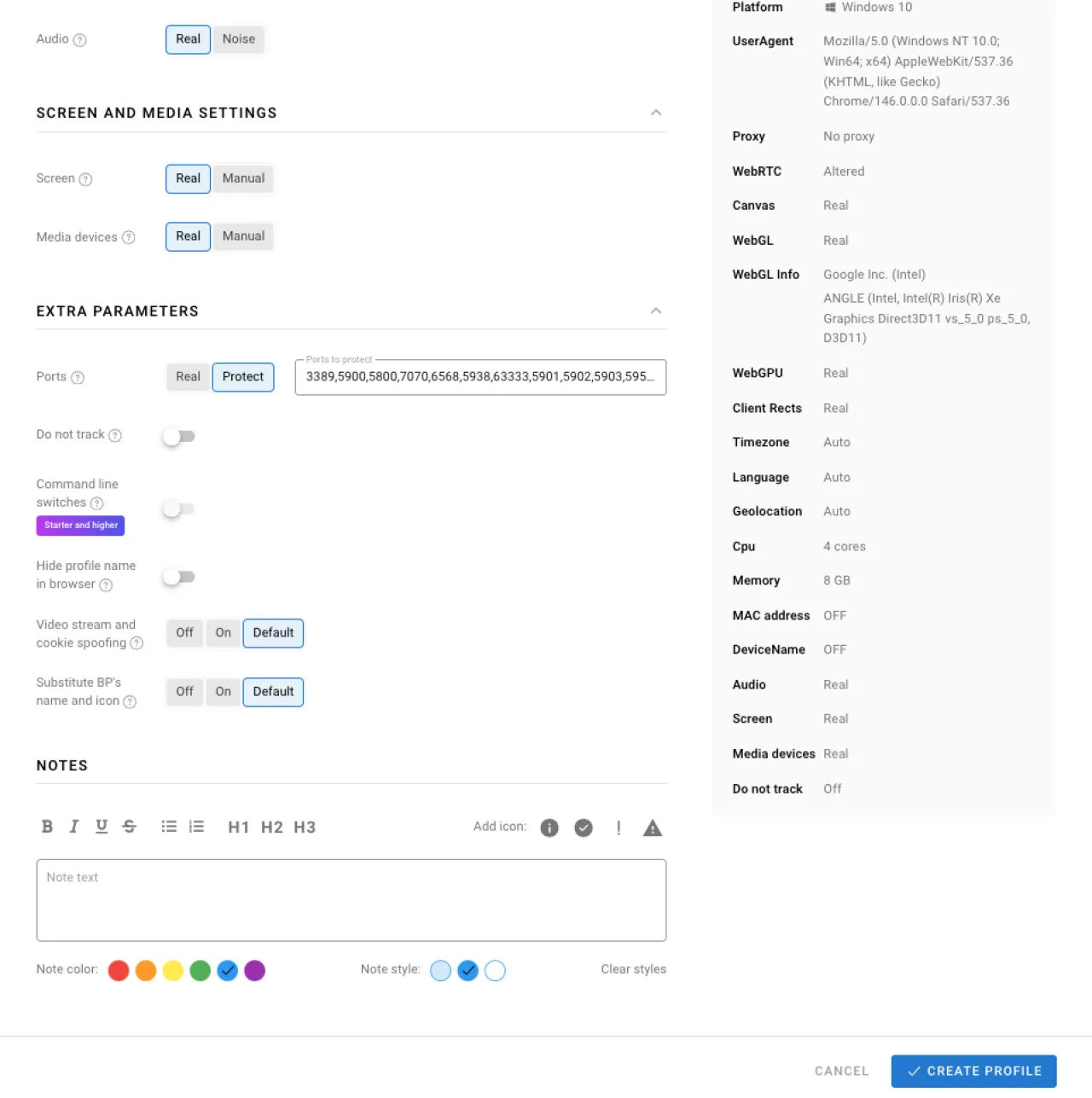
You can also check the documentation here to understand what each parameter in the screenshots above means.
What to pay attention to
Now that we’ve covered the tools, let’s summarize with some final recommendations. In multi-accounting, it’s important to carefully configure each profile so that systems truly perceive them as different users. Here are the key risk factors and nuances:
-
Consistency between your IP and fingerprint. It’s not enough to just use proxies and an antidetect browser, everything has to be set up properly. For example, if your proxy has a French IP address, then the timezone should match France, and ideally the language as well. Language can be a gray area, for instance, a Japanese citizen living in France may still use Japanese while having a French IP, and that’s normal. However, in multi-accounting, it’s better to maximize consistency between IP, timezone, and language.
-
Choosing proxies based on your needs. Take proxy selection seriously, since different goals require different types of proxies. In some cases, mobile proxies may even be more cost-effective despite their higher price, it all depends on the situation.
-
Your IP shouldn’t change between different cities. This mainly applies to rotating residential proxies. During account usage, your IP should stay within the same city, or even better, within the same ISP. In other words, configure geo-targeting properly.
-
1 profile = 1 IP. This is a critical rule. Each account must have its own proxy. If you’re using mobile proxies, make sure to change the IP before logging into a different account.
-
User behavior and timing. Automated actions are often detected due to repetitive patterns. Systems analyze when and how actions are performed, including click speed, navigation paths, and posting frequency. You need to realistically randomize delays between actions, simulate browsing across different pages, and so on. If all accounts follow the exact same sequence of actions, for example sending messages at the same time, anti-fraud systems will detect a clear pattern.
-
Data consistency and uniqueness within each account. All data you use, such as email, phone number, KYC, and so on, must be unique and not overlap with other accounts. Also, if you’re creating an account for a specific persona, for example someone from France, then both the IP and fingerprint should match that region. It doesn’t make sense to complete KYC on a crypto exchange with Ukrainian citizenship while using a French IP. In that case, you should use a Ukrainian IP.
-
Warm up accounts before use. To significantly reduce the risk of bans, you should prepare accounts before actively using them. The internet ecosystem is interconnected, so if you just created a profile in an antidetect browser, spend some time browsing to accumulate cookies before registering on your target platform. For example, on social media, start with normal actions after registration, complete the profile, add friends, like pages, and post content. In other words, don’t immediately use accounts for your main purpose, first simulate real user behavior.
-
Chaos is your enemy. Keep everything organized, use folders, tags, tracking, and analytics. If you ignore basic organization practices in your antidetect browser, the chances of making mistakes increase significantly.
Common Mistakes
Although we’ve already covered the key points in the recommendations to help you avoid mistakes, let’s briefly summarize what you should avoid:
-
Mismatch between IP address and digital fingerprint
-
Using the same IP address for multiple accounts
-
Using frequent rotation (short sessions) with rotating residential proxies
-
Using datacenter (server) proxies
-
No account warm-up before use
-
Abnormal changes in IP geolocation within a single account
-
Identical actions across all accounts
-
Using the same supporting data (bank card, wallet, etc.) for multiple accounts
-
Manually configuring the fingerprint without understanding what each setting does. In other words, if you don’t know how to properly configure a fingerprint in an anti-detect browser, it’s better not to touch it or try to change anything manually.
Preparation Stages for Multi-Accounting
We’ve now built a solid foundation for multi-accounting: we’ve covered proxies, anti-detect browsers, key recommendations, and common mistakes. Now let’s outline the steps required to get started. The easiest way to present this is in a table.
| Stage / Role | Actions |
|---|---|
| Preparation |
|
| Anti-detect browser setup |
After this point, all steps below are performed inside the anti-detect browser, where 1 profile = 1 digital identity. |
| Account registration |
|
| Profile warm-up |
|
| Launch main activity |
|
In this table, we assume that all actions are performed "white-hat" (i.e., within platform rules). For example, if you need to test mass registration on your own website, you’re using multi-accounts for QA purposes. If, however, you’re trying to manipulate competitor reviews, that would fall under "gray" use cases, which we do not support and therefore do not cover here.
Conclusion
When used correctly, multi-accounting can deliver excellent results. The key is choosing the right proxies and using a reliable anti-detect browser. If you’re a beginner, start with a few profiles — this will help you practice and focus on understanding how everything works.
It is also important to understand that each website has its own anti-fraud systems. In some cases, datacenter proxies may work for the sites where you plan to create multiple accounts, everything is highly individual. Moreover, if you use datacenter proxies, it does not mean that you will be banned immediately, since you may simply be a regular user who is not engaged in multi-accounting but uses proxies for anonymity, and anti-fraud systems should not block users solely for the fact of using proxies. Anti-fraud systems react to a combination of factors, and in this article we have shown how to make multi-accounting as unnoticeable and effective against them as possible. You can use this article as a foundation, but always adjust your choices based on your goals and risks.
Everything comes with experience, and in this article, you’ll find answers to most of your questions so you can confidently get started with multi-accounting while minimizing mistakes. There was a lot of information covered, so if you still have unanswered questions or would like to see certain topics explained in more detail, feel free to leave a comment below.
Useful Links
FAQ
- What is multi-accounting?
- Multi-accounting is when one person creates and uses multiple accounts on the same platform. Usually, this is done to scale results, test different approaches, or increase overall profit.
- Is multi-accounting allowed?
- In most cases, it’s not directly illegal, but it does violate the rules of many platforms. Because of that, accounts can get banned even if you’re not breaking any laws.
- Why do accounts get banned so quickly?
- Most beginners get banned because they don’t understand how anti-fraud systems work. The system doesn’t just look at your IP, it looks at everything and quickly connects accounts that look similar.
- Do I really need both proxies and an anti-detect browser?
- Yes, you do. If you only use proxies, your accounts will still be linked by fingerprint. If you only use an anti-detect browser without proxies, your IP will give everything away.
- What exactly does a proxy do?
- A proxy changes your IP address. That’s it. But even though it’s simple, choosing the wrong type of proxy is one of the fastest ways to lose accounts.
- What is a digital fingerprint in simple terms?
- It’s basically how a website "sees" your device. Things like your browser, system, screen, and even small technical details form a unique profile.
- Which proxies should I actually use?
- There is no one-size-fits-all answer. For long-term accounts, ISP proxies work well. For scaling and farming, residential proxies are often better. If budget allows, mobile proxies are the safest option.
- Why are datacenter proxies a bad idea?
- Because they don’t look like real users. Anti-fraud systems can easily see that these IPs belong to servers, not real people, and that raises suspicion immediately.
- What is the main mistake with rotating proxies?
- Using rotation that is too frequent. If your IP changes every few minutes, it doesn’t look natural, and that can trigger detection.
- Can I run multiple accounts on one proxy?
- In most cases, no. One account should have one IP. With mobile proxies it’s possible, but only if you change the IP before switching accounts.
- How important is matching IP and location settings?
- Very important. If your IP is from France, but your timezone or setup says something else, it creates inconsistencies that anti-fraud systems can pick up.
- Do I need to warm up accounts?
- Yes, if you want them to survive. Fresh accounts with instant activity look suspicious. It’s better to act like a normal user first.
- What does "normal behavior" actually mean?
- It means not doing everything at once and not repeating the same actions across accounts. Different timing, different actions, some randomness.
- Can I reuse emails, numbers, or cards?
- No. Everything must be unique. If the same data appears across accounts, they can be linked very quickly.
- Where should a beginner start?
- Start small. A few accounts are enough to understand how everything works. It’s much better to learn slowly than lose a large batch of accounts right away.