Last updated: 2026-08-09
In this article, we will explain how you can set up your own mobile proxy using an Android phone.
Note: This article is not about adding a proxy to an Android phone. It shows how to turn an Android phone into a mobile proxy that can be used remotely for tasks like multi-accounting, web scraping, and more.
There are two popular services that allow you to create a proxy using a mobile phone: IProxy and Proxidize. Since Proxidize offers a free version for up to 5 devices (ports), we will focus on this option.
To set up a mobile proxy, you will need:
-
An Android smartphone running version 8.0 or higher (1 phone = 1 port)
-
A SIM card with an active plan (1 SIM card = 1 phone)
Step 1. Register and download the mobile app
-
Register on the website: https://proxidize.com/
-
Download the mobile app from Google Play using this link - here
Step 2. Sync your smartphone with the website
When you open the app, you will be prompted to enter a PIN code or scan a QR code. To find it, click on "Proxy Builder".
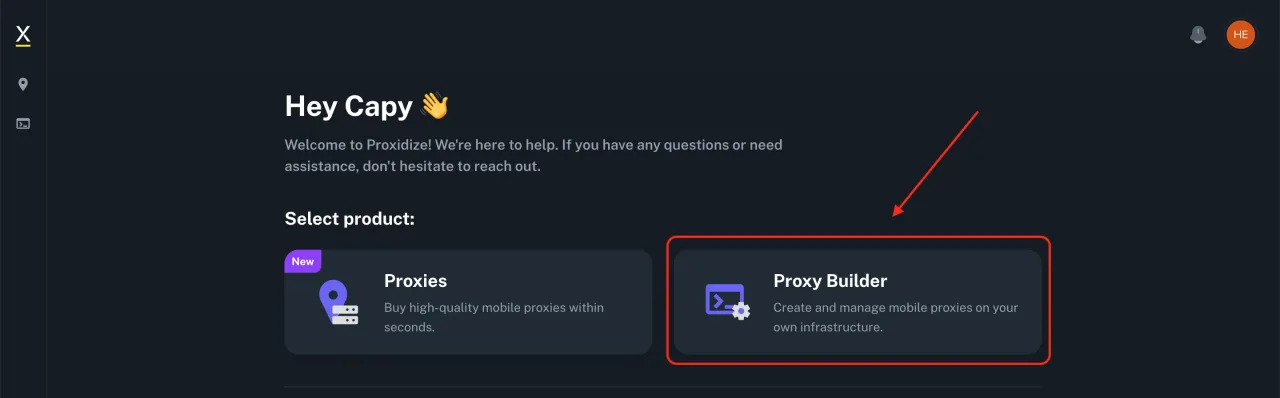
Then, in the top right corner, you will see the QR code icon and the PIN code next to it. If you want to scan the code, click on the QR code, or manually enter the PIN code in the Proxidize app.

Step 3. Configure the app
To configure the app, you need:
-
Enter a device name. You can choose any name, it does not affect the proxy setup.
-
Grant permissions to the Proxidize app. Permissions 1 and 3 should not cause any issues. For the second permission, if a Google icon appears and you cannot grant access, click on the Google icon and select the Proxidize app.

Step 4. Start and test the proxy
To start the proxy, tap Connect in the Proxidize app. Once the connection is established, you can begin using the proxy.

On the Proxidize website, under the "Proxies" tab, you will see your connected device. Copy the information including the server, port, username, and password.

In the "Hardware" menu, under "Endpoints" you can check the status of your connected device. You can also configure IP address changes if you have a paid plan. For the free plan, you can change the IP address using airplane mode (turning it on and off).
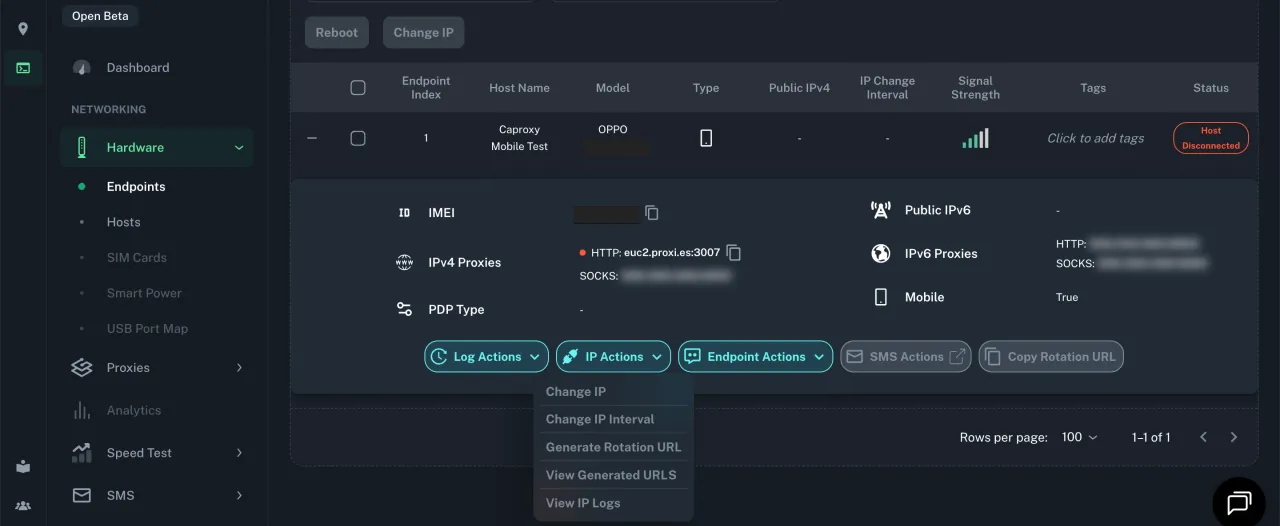
Common Setup Mistakes and How to Spot Them
Most failures at this point look identical from the outside: the phone says it is connected, but the proxy does not answer. The difference is visible in the Hardware > Endpoints screen and in the result of a single connection test. Below are the cases that account for almost every broken setup.
The device stays offline in Hardware > Endpoints. In nine cases out of ten the second system permission went to Google instead of the Proxidize agent. Android shows a Google icon in that dialog by default, and tapping through without changing the target application silently assigns the privilege elsewhere. Open the permission again, tap the Google icon, pick the Proxidize agent from the list, then restart the agent. The endpoint should flip to online within a few seconds.
The second phone refuses to take a port. The rule is rigid: one phone is one port, and one SIM card is one phone. A second device connected over the same account and the same SIM will not receive its own port, and the panel will show either a duplicate entry or an endpoint that never comes up. Each additional port needs its own handset with its own active plan.
The agent does not start at all on older Android. Anything below version 8.0 is out of scope: the application either fails to install from Google Play or opens and closes immediately. There is no workaround on the phone side, so check the Android version before buying a used handset for this purpose.
The connection dies after a few hours. This is battery optimization, not the proxy. Android puts a background application to sleep, the tunnel drops, and the endpoint goes offline while the screen is off. Exclude the Proxidize agent from battery saving, disable adaptive battery for it, allow background data, and keep the phone on a charger. A handset acting as a proxy is a server, and servers do not get to sleep.
Airplane mode does not change the IP. On the free plan rotation is manual, and the carrier sometimes keeps the session alive across a short toggle, handing back the same address. You will see it immediately: check the exit IP before and after, and if the two match, hold airplane mode for thirty to sixty seconds instead of a quick tap, or restart mobile data. If the address still does not move, the carrier is reusing the session and only a longer disconnect will force a new one.
Test the proxy before you hand it to software. Copy the server, port, username and password from the Proxies tab and check the string in the IP:PORT:LOGIN:PASSWORD format with our proxy checker. Two minutes there save an hour of debugging inside an antidetect browser or a scraper, because those tools report a failed profile the same way whether the problem is the proxy, the credentials or the fingerprint. If the checker returns a working status and the country of your carrier, the phone side is done, and anything that breaks after that is configuration in the client.
One more detail worth checking on the client side: authorization. If your tool supports only IP whitelisting and the endpoint expects a login and password, the connection fails with a generic error. The difference between the two schemes is covered in our guide on login/password and IP authorization.
Free Plan Limits: When Your Own Phone Stops Being Enough
The free tier is generous in ports and strict in everything else. Five ports means five physical Android handsets and five SIM cards on active plans, because the pairing is fixed: one phone is one port, one SIM is one phone. The software costs nothing; the hardware and the mobile plans do. Before you scale, count what five carrier subscriptions cost in your country per month, because that is the real price of your farm.
The second limit is rotation. On the free plan the IP changes only when you toggle airplane mode by hand. Scheduled rotation and rotation by a request link belong to the paid plan, which means an unattended session that needs a fresh address every ten minutes is not something a free setup can do. If per session or per request rotation is the core of your workflow, look at rotating mobile proxies instead of building it yourself.
The third limit is geography, and it is absolute. Your exit address is whatever your carrier gives you, in the country where the SIM card is registered. There is no location picker, no city targeting, no switching to another country for one task. A farm assembled in one country serves that country only.
Where the free setup works well:
-
A handful of accounts on one platform, logged into manually, where a genuine carrier IP matters more than rotation speed.
-
Warming up profiles in an antidetect browser over weeks, with one stable mobile IP per profile.
-
Occasional verification tasks: registration, SMS confirmation, checking how a page looks from a mobile network.
-
Testing whether mobile IPs actually solve your problem, before spending anything on a subscription.
Where it breaks:
-
Dozens of parallel sessions. Five ports is five concurrent exit points, and no amount of tuning changes that.
-
Tasks tied to a country other than yours. Geo targeting is impossible on your own hardware.
-
Continuous uptime without you in the room. Phones overheat, reboot after updates, lose signal and drop off the panel, and every recovery is manual.
-
Scraping volume. Traffic through a single SIM is limited by the carrier plan, and a scraper that needs steady throughput will hit the fair use ceiling long before the proxy software complains. For that workload, ready made pools listed in our web scraping proxy selection are the practical answer.
The honest test is this: if the farm needs to run while you sleep, it is no longer a free project. Either you accept manual babysitting, or you pay for rotation and uptime on someone else's hardware.
Conclusion
That’s it! Setting up your own mobile proxy took about 5 minutes. With Proxidize, you can connect up to 5 devices for free. If you need more features or more devices, you will need to switch to a paid plan.
Buying Ready Mobile Proxies Instead of Building Them
Building the farm yourself trades money for labor. Buying the same thing from Proxidize costs a fixed amount per address, and the pricing is unusually flat, so the math is easy to do in advance.
Dedicated mobile proxies run at $59 per IP per month, and that number does not move: 1 IP, 5 IPs, 10 IPs, 20-30 IPs and 50 IPs all cost the same per address. There is no volume discount at any step, so ten ports are $590 per month and fifty ports are $2,950 per month. Premium mobile proxies sit at the same $59 per IP across identical steps. Plan accordingly: with this structure, scaling gives you nothing except a bigger invoice, and any saving has to come from using fewer addresses rather than negotiating a better rate.
The traffic based option is priced the same way. Rotating mobile proxies are $2 per GB at 40-60 GB and still $2 per GB at 5000 GB, with every intermediate step (100-150 GB, 200 GB, 500-600 GB, 1000 GB, 2000 GB) at the identical rate. Rotating residential proxies are $1 per GB on every step from 40-60 GB up to 5000 GB. Mobile costs exactly twice as much as residential here, which is the number to keep in mind: 100 GB of mobile traffic is $200 per month against $100 for the same volume of residential.
Mobile proxies, price per GB
| Volume | Rotating mobile, $/GB | Rotating residential, $/GB |
|---|---|---|
| 40-60 GB | $2 | $1 |
| 200 GB | $2 | $1 |
| 1000 GB | $2 | $1 |
| 5000 GB | $2 | $1 |
Geography is the deciding factor for many readers. Every mobile product here is United States only: one country for dedicated, premium and rotating mobile alike. Residential is sold worldwide. If your task is tied to a carrier in Germany, France or Ukraine, the mobile product simply cannot serve it, and either residential from the same catalog or a mobile provider with the right country is the way out. Our 4G/5G mobile proxy rating lists who covers which markets, and for US traffic specifically there is a separate selection of US mobile providers to compare that $59 per IP against.
The company was founded in 2022, the pool is listed at 1M+ IPs, and payment goes through Visa/Mastercard or crypto.

Proxy Type
Mobile Proxies, Residential Proxies
Pool of IPs
1M+ IP
Date established
2022
Headquarters
United States
Pros & Cons
- High-quality proxies
- Affordable mobile proxy pricing
- Ability to create your own proxies using an Android phone
- Free trial for creating your own proxies
- Available GEO: only the United States
So which way is cheaper? Take a realistic case: you need five US mobile ports running around the clock for multi-accounting. Bought ready, that is five dedicated addresses at $59, or $295 per month, with rotation by link and uptime that does not depend on your phones. Built yourself on the free plan, it is five handsets, five active SIM plans and manual airplane mode toggling for every IP change, with the software itself costing nothing. The build wins on cash and loses on attention, so the break even point is not a price, it is how many hours per month you are willing to spend restarting phones.
If the work is scraping or anything else where a residential IP passes just as well as a mobile one, skip the farm entirely: $1 per GB on rotating residential proxies beats both options on cost and on coverage, and it needs no hardware at all. Keep the mobile route for the tasks that genuinely require a carrier IP, such as accounts on platforms that treat mobile networks differently. Our multi-accounting proxy selection is the place to compare those.