Our Test
How this test works
The code of this test is open — run it on your own proxies: github.com/caproxy-com/proxy-benchmark
Pricing
Prices checked against the Evomi website:
- ISP Proxies
- Static Residential Proxies
- Shared Datacenter Proxies
- Rotation Residential Proxies
- Rotation Mobile Proxies
Specifications

Evomi in our rankings
Proxy Type
- Mobile Proxies
- Residential Proxies
- ISP Proxies
- Datacenter Proxies
- Static Residential Proxies
- Shared Datacenter Proxies
- Rotation Residential Proxies
- Rotation Mobile Proxies
Available Countries
- United States
- United Kingdom
- Germany
- France
- Canada
- Netherlands
- Japan
- Brazil
- India
- Poland
- Spain
- Italy
- Australia
- Ukraine
- Turkey
- Korea
- United States
- United Kingdom
- Germany
- France
- Canada
- Netherlands
- Japan
- Brazil
- India
- Poland
- Spain
- Italy
- Australia
- Ukraine
- Turkey
- Korea
- United States
- United Kingdom
- Germany
- France
- Canada
- Netherlands
- Japan
- Brazil
- India
- Poland
- Spain
- Italy
- Australia
- Ukraine
- Turkey
- Korea
- United States
- United Kingdom
- Germany
- France
- Canada
- Netherlands
- Japan
- Brazil
- India
- Poland
- Spain
- Italy
- Australia
- Ukraine
- Turkey
- Korea
- United States
- United Kingdom
- Germany
- France
- Canada
- Netherlands
- Japan
- Brazil
- India
- Poland
- Spain
- Italy
- Australia
- Ukraine
- Turkey
- Korea
- United States
- United Kingdom
- Germany
- France
- Canada
- Netherlands
- Japan
- Brazil
- India
- Poland
- Spain
- Italy
- Australia
- Ukraine
- Turkey
- Korea
Interface Language
- English
- Русский
- 简体中文
- Español
- Deutsch
Payment Methods
 Crypto
 AliPay
 Visa/Mastercard
 Google Pay
 Apple Pay
 WeChat Pay
 Twint
Twint
Video review
Our Review

Last updated: 2026-10-19
Evomi is a Swiss proxy provider that has been building its own proxy infrastructure for more than seven years. It offers five types of proxy products, two scraping products, and a pricing model that truly sits at the lower end of the market. To put it into perspective, the Core Residential plan starts at $0.49/GB, and that is probably the lowest price for residential proxies we have ever come across. However, let us look at the full picture and explain what products are available and how much they cost, cover the key differences between the proxy types, and also test how convenient the dashboard is in practice and evaluate the quality of Evomi's proxies.
In short, Evomi is an excellent fit for individual developers, small teams, and data engineers who need ethically sourced proxies at a competitive price. Evomi may not be the most recognizable brand in the industry, but its product lineup is well structured, although it does come with a few nuances that we will discuss later. The free trial removes most of the risk when trying the service for the first time.
What Types of Proxies Does Evomi Offer?
Evomi offers five separate proxy products, which is significantly more than many mid-market providers. Looking a bit closer, you can see that they sell one static proxy plan with per-IP pricing and four rotating proxy plans with traffic-based pricing.
We will not focus on static proxies because there is only one plan and the country selection is fairly limited. However, it is important to know that these proxies come with unlimited traffic and are usually used in situations where you need a static IP address for a long session, such as multi-accounting.
As for rotating proxies, Evomi offers four products, and it is important to understand the differences before purchasing. In particular, it is worth taking a closer look at the differences between the Core Residential and Premium Residential plans, because they are essentially the same type of proxy with different functionality. At the same time, Core Residential proxies are almost six times cheaper than Premium Residential.
Let us move from theory to practice and look at the key differences in table form. By the way, this table is fairly unique because you will not find a detailed comparison of these plans even on the official Evomi website.
| Core Residential | Premium Residential | Datacenter Proxies | Mobile Proxies | |
| Pricing | ||||
| Pay As You Go Pricing | $0.99/GB | $3.98/GB | $0.45/GB | $3.98/GB |
| Cost of 8 GB of Traffic | – | $3.75/GB | – | $3.75/GB |
| Cost of 100 GB of Traffic | $0.49/GB | $3.2/GB | $0.40/GB with purchases starting at 200 GB | $3.2/GB |
| Cost of 500 GB of Traffic | $0.49/GB | $2.8/GB | $0.35/GB | $2.8/GB |
| Cost of 5000 GB of Traffic | $0.49/GB | $2.2/GB | $0.30/GB with a 1000 GB purchase | $2.2/GB |
| Features and Capabilities | ||||
| Minimum Purchase | 100 GB of traffic | 8 GB of traffic | 200 GB of traffic | 8 GB of traffic |
| IP Pool Size | 50M (can be expanded to match the Premium pool size with a 6x multiplier) | 180M+ | 3M+ | 2M+ |
| Proxy Rotation Settings | Rotate on every request, sticky sessions, time-based rotation sessions | Rotate on every request, sticky sessions, time-based rotation sessions | Rotate on every request, sticky sessions, time-based rotation sessions | Rotate on every request, sticky sessions, time-based rotation sessions |
| ISP Targeting | Available, 4x multiplier | Available, free | Available, free | Not available |
| ASN Targeting | Available, 5x multiplier | Not available | Not available | Not available |
| Quality/Speed Settings | Available, but controlled through separate settings: Minimum Node Connection Time (1.4x), IP Fraud Score (3x), Response Time (1.55x) | Available, free | Not available | Not available |
| Other Features | TCP/IP Fingerprint (1.95x), Local DNS Resolution (1.1x), ZIP Code Targeting (1.4x), HTTP3/QUIC Support (1.5x), UDP Protocol Support (1.5x) | Not available | Not available | Not available |
| When Should You Choose It? | When you do not need detailed ISP or ASN-level targeting and a pool of around 50 million IP addresses is sufficient for your use case. | If you need a small amount of traffic, up to 100 GB, or require a larger IP pool and ISP-level targeting. | When datacenter IP addresses are sufficient for your use case and the target website does not block them. | These are essentially residential proxies that use mobile IP addresses. Their pool is smaller than residential proxies, but they perform better against anti-bot protections. |
The main differences come down to pricing, the minimum amount of traffic included in each plan, as well as how pricing is calculated and how flexible the configuration options are.
When comparing the Core and Premium residential proxy plans, it is important to understand that in some cases Premium may actually provide better value. The Core plan applies pricing multipliers based on the settings you use, and if you need a larger proxy pool similar to the Premium plan or detailed ISP-level targeting, the Premium plan may ultimately be cheaper than Core after all multipliers are applied.
That said, the default Core settings will be sufficient in about 90% of use cases, and you may never need the additional options. Therefore, if you are looking for affordable and high-quality residential proxies, Evomi is an excellent choice.
Static ISP Proxies: Two Countries and a Per-IP Bill
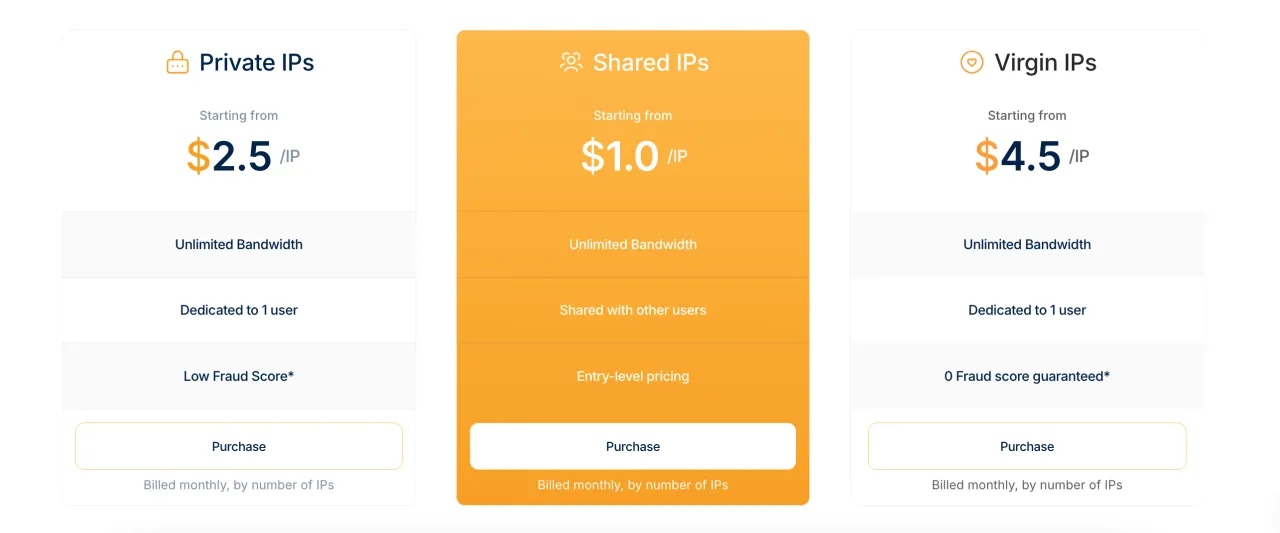
Evomi's static side covers Germany and the United States, and the price sits between $1.00 and $4.50 per IP a month. Prices verified in October 2026.
That is the entire static catalog. If the account you want to park lives in the United Kingdom, Spain or Brazil, Evomi is not a candidate at all, and no volume discount changes that.
Static addresses are billed per IP per month, so they cannot be compared with anything priced per gigabyte. Here are the three providers in our catalog that sell this product in a form you can buy yourself.
| ISP / Static Residential, $/IP per month | Price per IP | Countries |
|---|---|---|
| Evomi | $1.00-4.50 | 2 |
| Proxy-Cheap | $1.99-3.59 | 20 |
| BirdProxies | $1.58 | 6 |
For one cheap German or American address, Evomi's floor is the lowest of the three. Ask for a third country and it leaves the comparison entirely, while Proxy-Cheap keeps a flat per-IP rate across twenty of them.
One line in the refund policy makes the country choice final: "Static (Residential) ISP Proxies are therefore treated as consumed upon delivery." You pay for a wrong guess yourself, so decide the country before checkout, not after the first login attempt.
If you are buying static addresses for account work rather than for scraping, compare the country lists first. Our ratings of ISP providers and static residential providers line them up side by side, and the multi-accounting selection covers which of them survive account checks.
Pricing in Detail
Earlier, we looked at pricing from the perspective of subscription plans and pay-as-you-go billing, and also showed how the cost changes depending on the purchase volume. Now let us take a closer look at the pricing structure.
| Core Residential | Premium Residential | Datacenter Proxies | Mobile Proxies | |
| Pay As You Go | $0.99/GB | $3.98/GB | $0.45/GB | $3.98/GB |
| 8 GB of Traffic | – | $3.75/GB | – | $3.75/GB |
| 25 GB of Traffic | – | $3.6/GB | – | $3.6/GB |
| 50 GB of Traffic | – | $3.4/GB | – | $3.4/GB |
| 100 GB of Traffic | $0.49/GB | $3.2/GB | – | $3.2/GB |
| 200 GB of Traffic | – | – | $0.40/GB | – |
| 250 GB of Traffic | – | $3.0/GB | – | $3.0/GB |
| 500 GB of Traffic | $0.49/GB | $2.8/GB | $0.35/GB | $2.8/GB |
| 1000 GB of Traffic | $0.49/GB | $2.6/GB | $0.30/GB | $2.6/GB |
| 2000 GB of Traffic | $0.49/GB | $2.4/GB | – | $2.4/GB |
| 5000 GB of Traffic | $0.49/GB | $2.2/GB | – | $2.2/GB |
As you can see, pricing for the Core Residential plan does not change based on purchase volume, while pricing for the other plans decreases as your monthly traffic volume grows. The more traffic you need, the lower the cost per gigabyte becomes. As for the Core plan, it is important to understand that this pricing applies without advanced settings enabled. If you need those settings, traffic consumption multipliers will apply, and in some situations other plans may provide better value than Core Residential.
The table above covers only rotating residential proxies, but Evomi also sells static ISP proxies. You can see their pricing in the screenshot below.
Evomi Against DataImpulse, Proxyscrape, Proxy-Cheap and 2extract
Evomi's own grid cannot tell you whether $0.49/GB is genuinely cheap. Five other providers at the same volumes can, so here is rotating residential traffic first.
| Rotation Residential Proxies, $/GB | 5-8 GB | 40-60 GB | 500-600 GB |
|---|---|---|---|
| Evomi (Core) | $0.99 | $0.99 | $0.49 |
| Proxyscrape | $4.85 | $4.25 | $2.75 |
| Proxy-Cheap | $4.99 | $4.99 | $4.99 |
| DataImpulse | $1.00 | $1.00 | $1.00 |
| BirdProxies | $5.45 | $4.60 | $4.30 |
| 2extract | $3.99 | $3.99 | $3.99 |
Only DataImpulse plays in the same range, and it stops discounting where Evomi's second step begins. At 500 GB a month that is $245 against $500, which pays for a lot of retries.
Now the same six on mobile traffic, where the ranking inverts.
| Rotation Mobile Proxies, $/GB | 5-8 GB | 40-60 GB | 500-600 GB |
|---|---|---|---|
| Evomi | $3.75 | $3.40 | $2.80 |
| Proxyscrape | $4.85 | $4.25 | $2.75 |
| Proxy-Cheap | $5.99 | $5.99 | $5.99 |
| DataImpulse | $2.00 | $2.00 | $2.00 |
| BirdProxies | $7.02 | $5.94 | $4.86 |
| 2extract | $4.99 | $4.99 | $4.99 |
The grouped bars below show the same three volumes across all six providers, and the shape of the mobile market in one look.
DataImpulse undercuts everyone at every step and roughly halves Evomi's mobile bill. If mobile addresses are your main spend, read our rotating mobile section before you top up here.
Evomi's mobile product does discount with volume, unlike its flagship Core plan, and the step line shows where the curve flattens out.
Datacenter traffic lands between the two stories. Evomi's entry per gigabyte is a touch under DataImpulse's small-volume rate, but the minimum purchase is 200 GB, so the cheaper unit only exists if you buy that much in one go.
The usual advice is to consolidate on one provider: one invoice, one dashboard, one support queue. We disagree, and this grid is why. Nothing technical ties your residential pool to your mobile pool, the credentials are separate strings in your config either way, and buying Evomi's mobile traffic out of loyalty to its residential price costs you roughly double per gigabyte. Split the order by product, not by vendor.
Our Own Test
On 24 September 2026 we ran our own checks against three Evomi products: Shared Datacenter, Rotation Residential and Rotation Mobile proxies. Each product got 200 requests from our own server in London.
Datacenter proxies answered all 200 requests, with a median response time of 748 ms and 13.4 Mbit/s on the transfer test. That is the fastest of the three, and it is exactly what you expect from a hosting network.
Rotating residential proxies also answered all 200 requests, at 691 ms median and 10.8 Mbit/s. Mobile came in at 198 of 200 successful requests, 894 ms median and 2.9 Mbit/s. Mobile is the slowest link here, and that is normal for the carrier path.
The reuse test matters more than raw speed if you work inside a session. On an already open connection, the median dropped to 291 ms on datacenter, 457 ms on residential and 340 ms on mobile, and every repeated request came out of the same IP on all three products. Keep your connections open and you pay the handshake once.
Rotation behaved as advertised: in each run every exit address was unique. That held for all three products.
We also looked at where the exit addresses live. On residential and mobile we found no addresses belonging to hosting and cloud networks. Read this as a lower bound rather than a precise classification: our network list is not exhaustive, so the real figure can only be the same or slightly higher.
Public abuse lists tell a similar story. None of the residential exits and none of the mobile exits appeared in the FireHOL lists, while 5.5 % of the datacenter exits did. A listed address is not an automatic block, but it is a head start for the other side.
Then we hit two real targets. Reddit let through every residential and every mobile request, and only half of the datacenter ones. Amazon was harsher: a quarter of the datacenter requests came back clean, and residential and mobile scored zero, which is a reminder that a clean ASN alone does not open a hostile target.
October Re-run: Zillow, Abuse Lists and Transfer Speed
We ran the same three products again on 11 October 2026, 200 requests each, and added a target that judges by address reputation rather than by browser fingerprint.
Availability barely moved. Rotating residential answered 98 % of requests, mobile and shared datacenter 98.5 % each. On uptime alone there is nothing to choose between them.
Zillow is where they separate. Mobile got through on every attempt, residential cleared 87.5 %, and datacenter fell to 62.5 %.
Reddit repeated the pattern: residential and mobile passed everything, datacenter passed 62.5 % of attempts. Public abuse lists agree, with no residential or mobile exits listed in FireHOL and 0.5 % of datacenter exits present.
Read that as one decision rather than three numbers. Against a target that scores the IP itself, Evomi's datacenter pool loses a third of your requests, and the few cents you saved per gigabyte do not cover the retries.
Throughput went the other way, as it always does: 13.2 Mbit/s on datacenter, 5.7 on residential, 2.8 on mobile, measured against about 1022 Mbit/s on our own line. The last mile is the constraint, not the machine running the test.
Inside an already open connection the median response was 379 ms on residential, 496 ms on mobile and 533 ms on datacenter. If your scraper opens a fresh connection per request, you are paying the handshake again every time. Reuse the session.
Protocols and Session Configuration
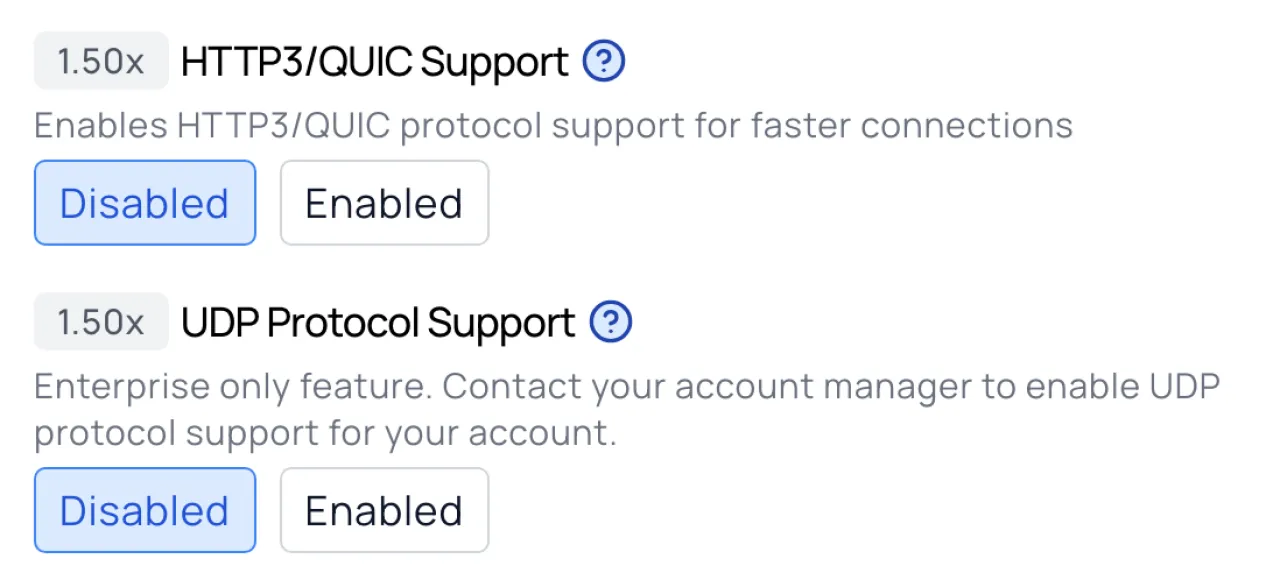
Evomi supports HTTP, HTTPS, and SOCKS5 across its proxy products. On Core Residential specifically, UDP and QUIC are available as optional toggles. This is genuinely uncommon. Most residential proxy providers only cover HTTP and SOCKS5, so the QUIC support opens up use cases around testing modern web applications that have migrated to HTTP/3 (see the official HTTP/3 setup guide). QUIC is the transport protocol underlying HTTP/3, meaning requests travel faster over unreliable connections because they avoid TCP's handshake overhead. UDP support is also documented in Evomi's expert settings guide. For web scraping specifically, this matters less than it does for browser-based automation, but it is good to have the option.
Sticky sessions are configurable from 1 minute up to 120 minutes through the standard endpoint format. If you need longer persistence, the _lifetime-1440 parameter extends the maximum to 1,440 minutes, which is 24 hours. There is also a hard session mode, which holds the same IP for as long as the underlying device remains connected. Hard sessions are less predictable in duration since they depend on the device owner's connectivity, but they are useful when you need genuine persistence rather than a timed window. For use cases that require maximum IP diversity, Evomi also supports rotating sessions, where a new IP is assigned on every request. This gives users flexibility between long-term persistence and continuous rotation depending on the task. One thing worth noting: IP whitelist authentication is not currently available. Authentication is username and password only. That works fine for most setups, but teams that use whitelist-based authorization in their infrastructure will need to factor this in.
Free Trial
Both Core Residential, Datacenter, and Mobile proxies are available with a free trial and no upfront payment required. The checkout total shows $0.00, though billing details are still required to activate the trial and a subscription is created during the signup process. This is a common pattern among proxy providers and exists to limit abuse, since free proxy access without any friction tends to attract exactly the wrong kind of users. For legitimate developers evaluating the service, the requirement to enter billing details is a minor inconvenience rather than a real barrier. Users should be aware that once the trial period ends, the subscription renews automatically and the corresponding plan fee is charged unless canceled beforehand. The free trial is a genuine zero-risk entry point, which is the right way to sell infrastructure products.
Refunds, Chargebacks and the Fine Print
The trial removes the risk of the first gigabyte. It does not remove the risk of the plan, and the refund policy is narrower than the 30-day window suggests.
You get 30 days to ask support for a refund with no questions asked, but only while you have used less than 10% of the data allowance or 1 GB, whichever is smaller. On a 100 GB Core Residential plan the money comes back only if you burned under one gigabyte of it, so the window covers a test that failed fast, not a plan that disappointed after a week.
Two exclusions decide how you should pay. Crypto payments are not refunded at all, because blockchain transactions cannot be reversed, and a pay-as-you-go balance is excluded as well, on the logic that the traffic never expires so nothing is lost.
Evomi accepts seven payment methods, including Twint, WeChat Pay, AliPay, Apple Pay and Google Pay, against three at DataImpulse and two at BirdProxies. That breadth is genuinely useful if cards are a problem where you live.
Pay the first order by card anyway. Choosing crypto on a trial purchase trades your only refund route for a convenience you do not need yet, and if crypto is a hard requirement for you, check our list of providers that accept it and what each of them refunds.
Dashboard and Proxy Configuration
Evomi's dashboard is well organized and divided into several main sections:
- Home page
- Purchased proxies (statistics, proxy configuration, subscription management, documentation, and support)
- Pricing plans where you can purchase a subscription
- Profile settings and subscription management
- General information and documentation
All pages are intuitive and easy to navigate, so we will not spend much time on them. Instead, let us take a closer look at configuring rotating proxies using the Core Residential plan as an example.
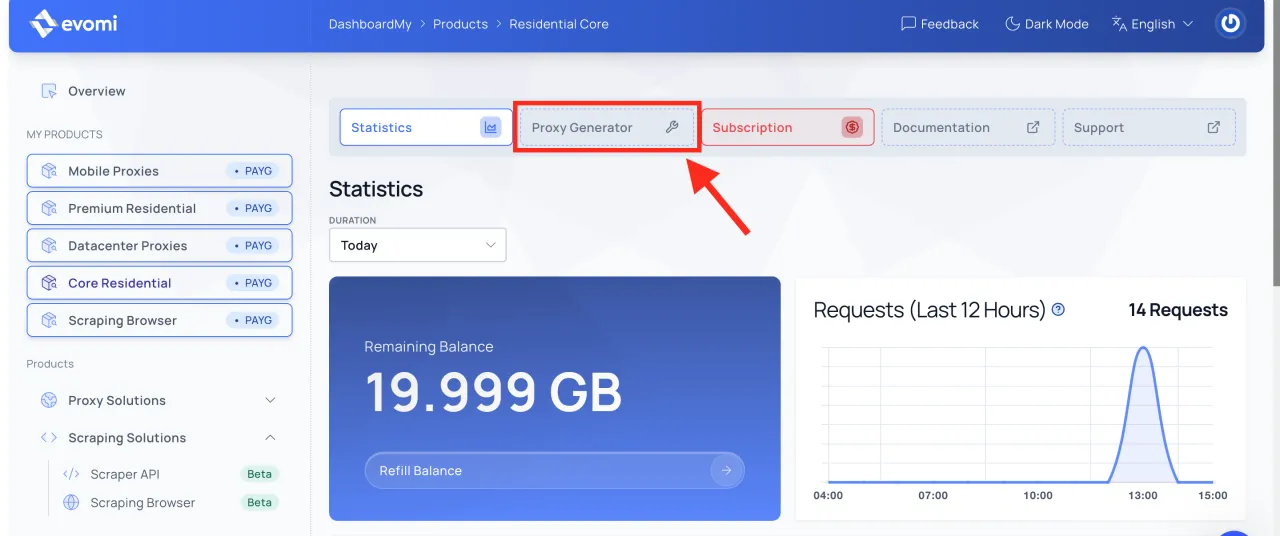
After completing your purchase, a tab with your purchased proxies will appear. Clicking on it will take you to the statistics page. To start configuring your proxies, click on the "Proxy Generator" tab as shown in the screenshot below.
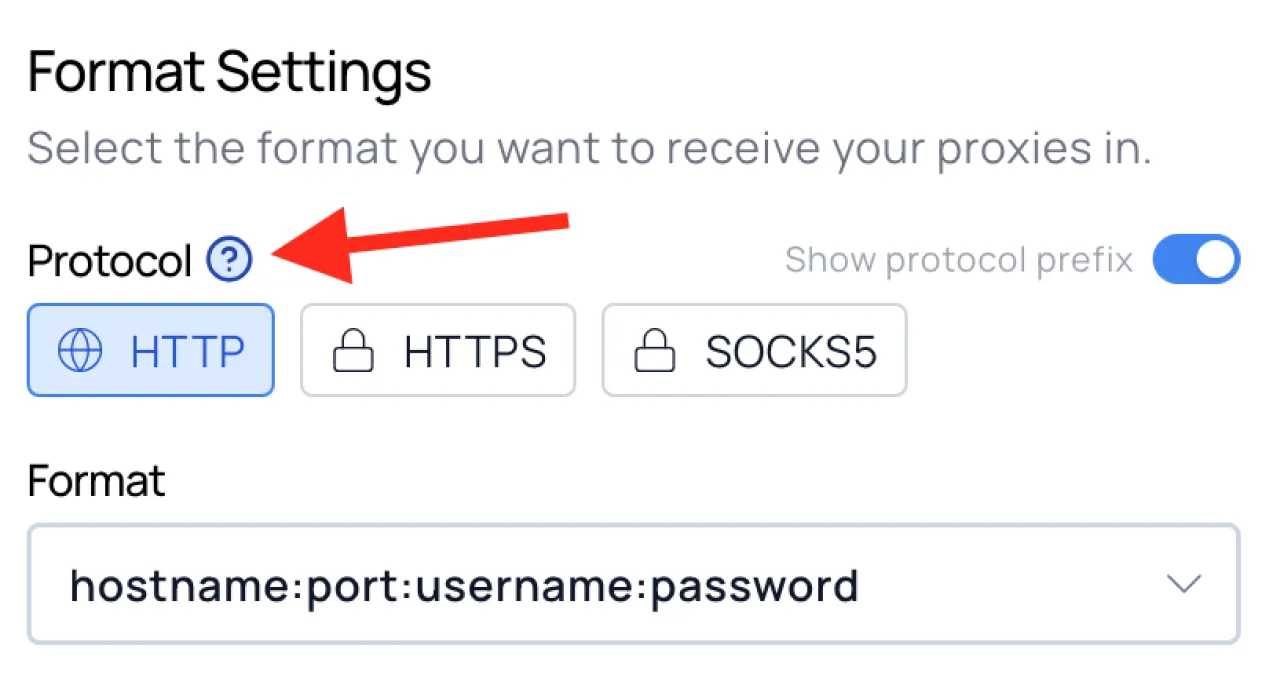
Great, now you can start configuring your Evomi proxies. In general, almost every configuration option is accompanied by documentation that you can access by clicking the "?" icon, as shown in the screenshot below.
 However, we will also briefly go through each section in case Evomi's documentation feels too technical or you simply do not have time to study it.
-
Format Settings. This section controls the output format of the generated endpoints (proxies). If you look to the right, you will see a field where the endpoint is generated in real time. As you change the protocol or location settings, you will immediately see how the generated proxy changes in the preview window. This makes it easy to generate a format that fits your workflow.
-
Location Settings. Here you can configure targeting at the country, city, or region level. This is useful when you need to appear as a user from a specific location, for example when checking local SEO search results or when the website you plan to scrape is only accessible from a particular country. It is worth noting that if you select multiple countries at the same time, more detailed city and region targeting options become unavailable.
-
Session Settings. This section determines how often the IP address changes within the generated endpoint. You can configure IP rotation for every request, rotate the IP after a specified period of time, or keep the same IP address for as long as possible. One interesting detail is that if you select rotation on every request, you can generate only a single endpoint. If you choose another session type, you can generate up to 1,000 endpoints, which effectively gives you 1,000 different proxies.
-
Expert Settings. To be clear, advanced settings are not necessary in roughly 90% of use cases, and you can already start using the proxies without them. However, they provide additional flexibility and allow you to fine-tune the proxies for specific tasks. We will not cover every setting individually because each option includes a short explanation and a link to detailed documentation. If needed, you can also contact Evomi's support team, which is happy to assist and answer any questions.
That is all there is to it. The generated endpoint (proxy) will appear in the panel on the right and can be used immediately.
Performance Metrics
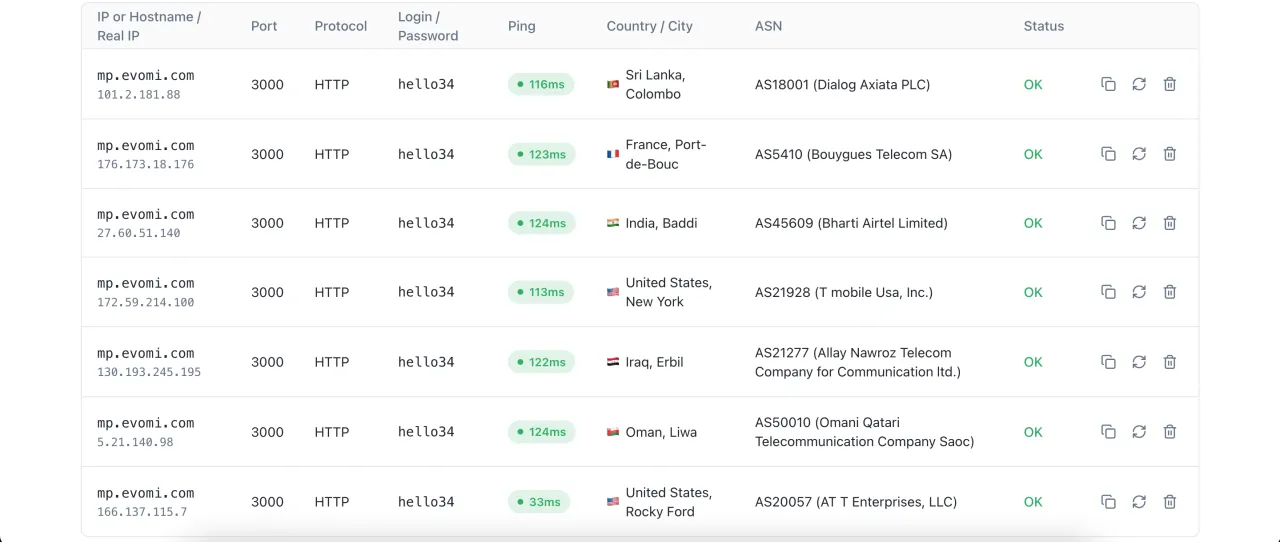
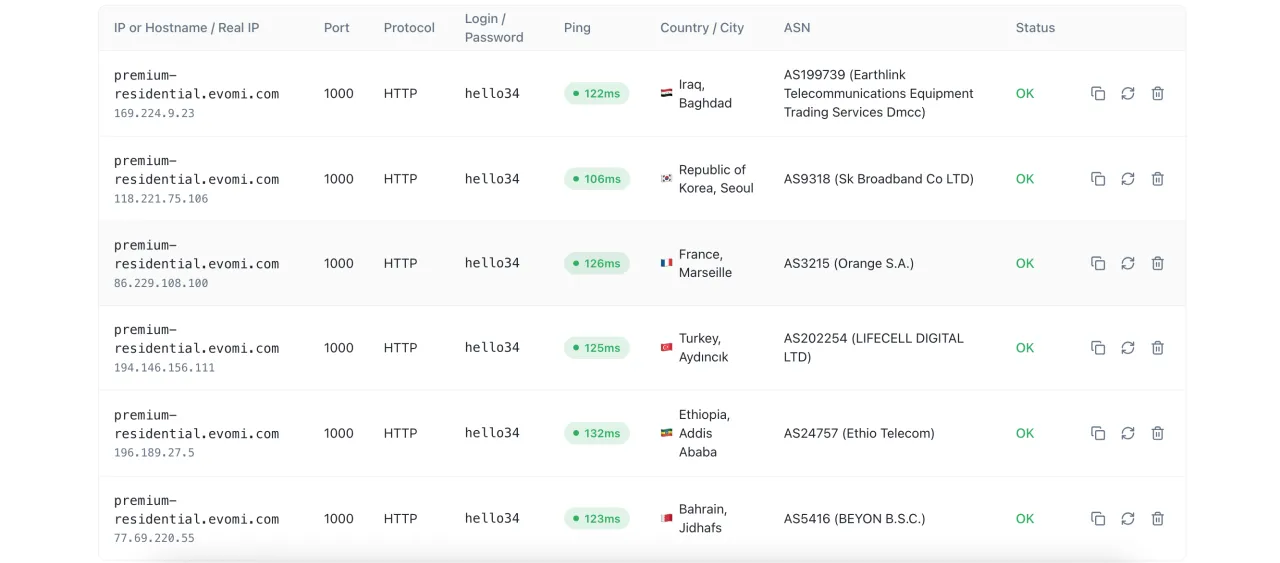
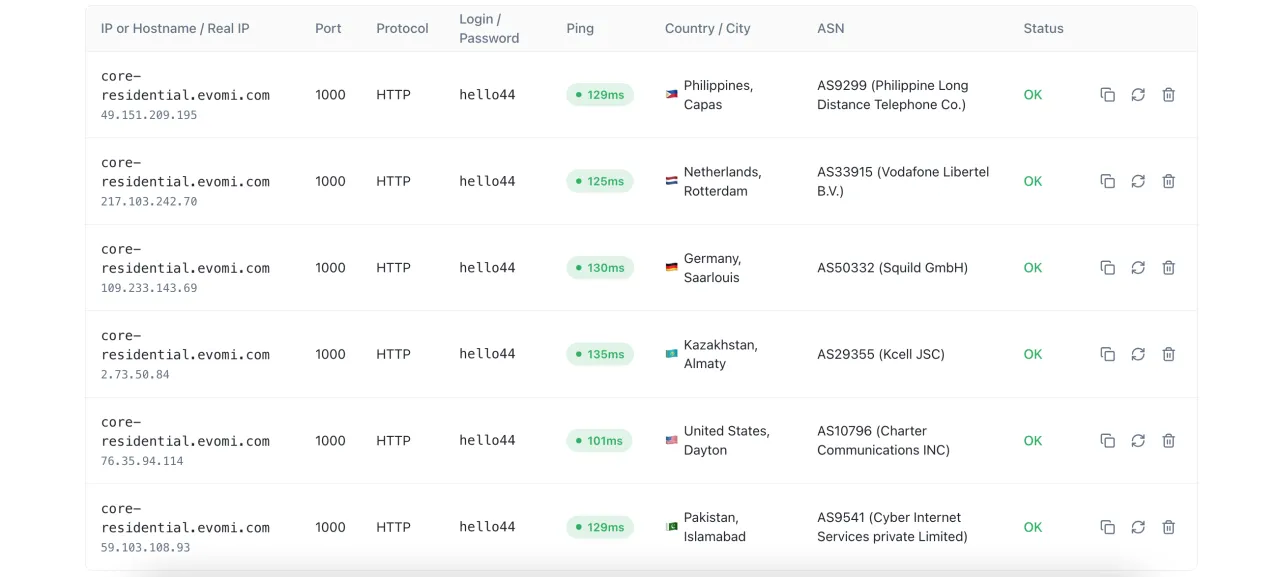
At the time of our testing, Evomi delivered excellent performance results. We conducted the tests using our dedicated proxy checker. Our current monthly measurements — success rate, response time and speed for each proxy type — are in the “Our Test” section at the top of this page. You can see the results for each proxy type in the screenshots below.
Mobile Proxies
Premium Residential Proxies
Core Residential Proxies
Datacenter Proxies
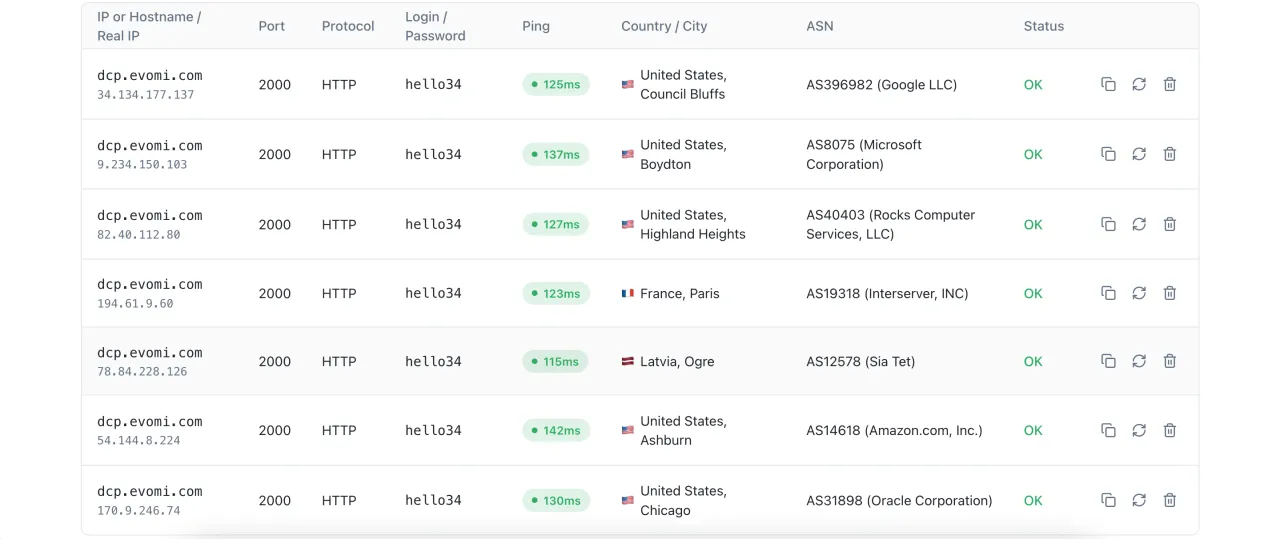
If you look closely at the test results, you will notice that datacenter proxies are primarily located in the United States, while the locations for residential and mobile proxies are much more diverse. This is explained by the fact that residential and mobile proxy pools are significantly larger than datacenter proxy pools, and most datacenters are located in the United States.
You can also see that residential proxies may include IP addresses from both home internet providers and mobile carriers. When using mobile proxies, however, all assigned IP addresses come exclusively from mobile operators.
We used random location assignment during testing, and location detection was accurate down to the ISP level. We also tested Evomi residential proxies using ISP-level targeting, and the results were excellent, as shown in the screenshot below.
Settings: Country: Ukraine, ISP: Lanet Network LTD
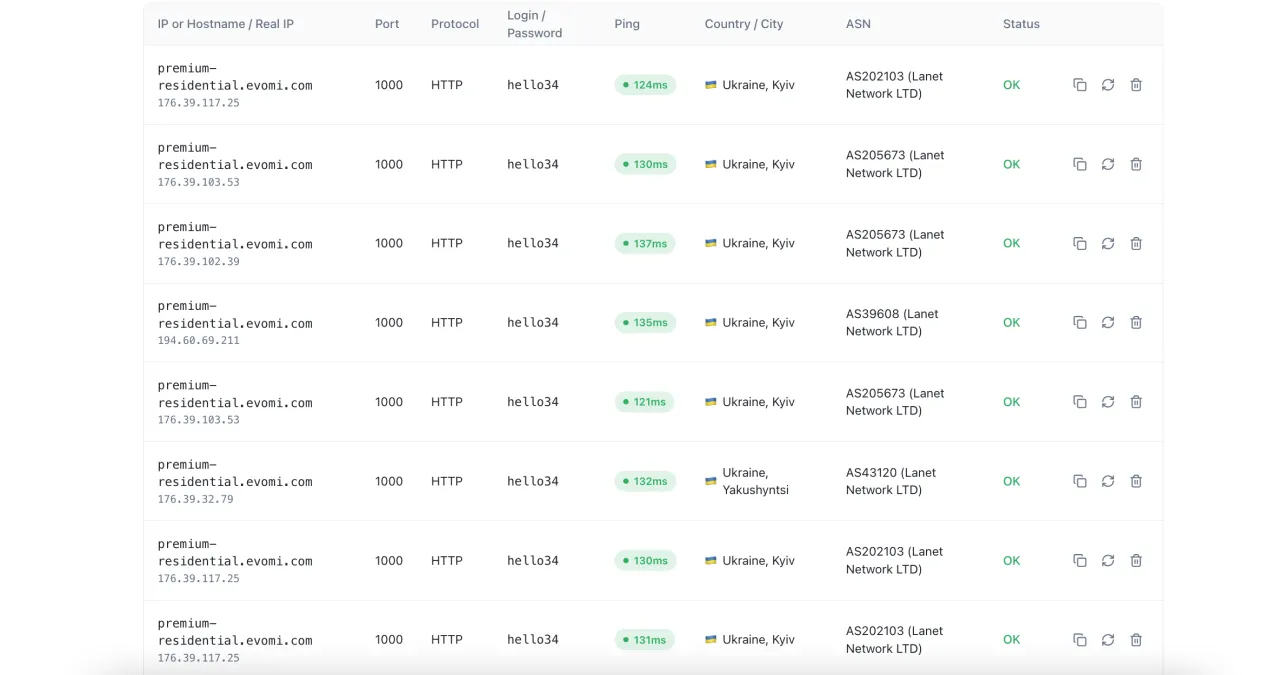
The only issue we noticed is that when using very specific targeting criteria, there may be situations where Evomi does not have a matching proxy available. In such cases, the proxy may appear non-functional when you attempt to connect or test it, while in reality there simply was no available IP address matching the selected criteria in the proxy generator. Ideally, the system should automatically prevent users from selecting options that currently have no matching IP addresses available.

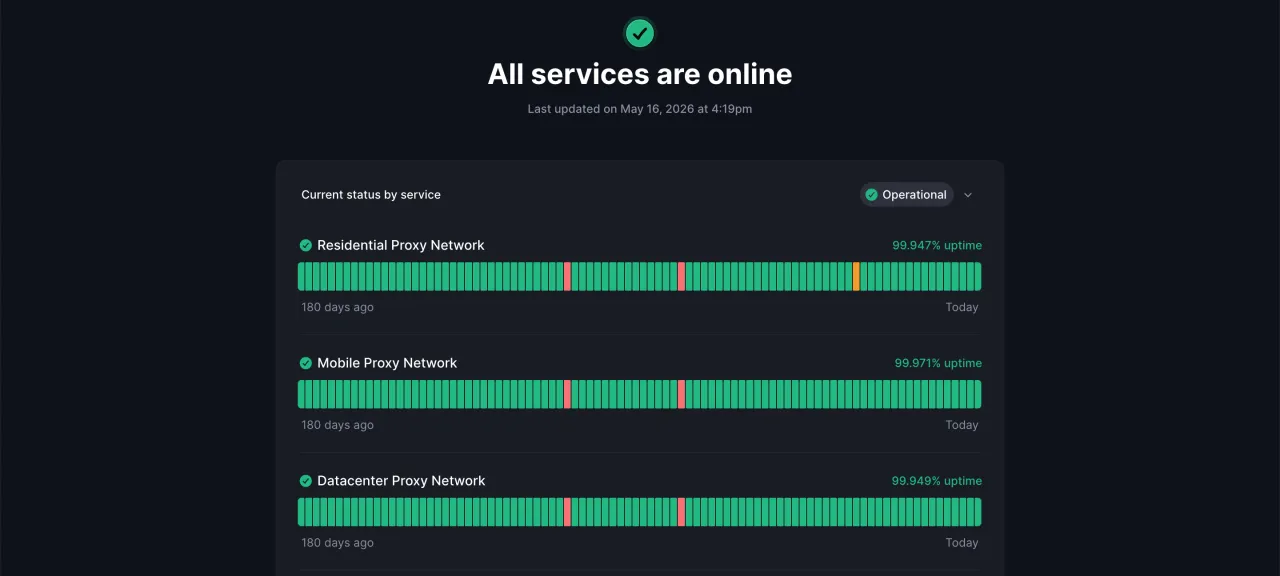
During our testing period, uptime was 100%. However, if you check the official status page at status.evomi.com, the reported uptime is 99.95%, which is still an excellent result.
Working Code Example
Below is a Python example using the requests library with retry logic, proper timeout handling, and session configuration for Evomi residential proxies. The requests library is the standard HTTP client for Python and handles proxy routing through a simple dictionary. The urllib3.util.retry.Retry class manages retries automatically so you do not have to write that logic by hand.
import requests
from requests.adapters import HTTPAdapter
from urllib3.util.retry import Retry

EVOMI_USER = "your_username"
EVOMI_PASS = "your_password"
# Using the _country-us_session-mysession123_lifetime-30 format
# The lifetime-30 means the sticky session holds for 30 minutes.
# Swap to _lifetime-1440 for the 24-hour maximum.
PROXY_HOST = "rp.evomi.com"
PROXY_PORT = 1000 # HTTP port for residential; use 1001 for SOCKS5

proxy_url = (
 f"http://{EVOMI_USER}_country-us_session-mysession123_lifetime-30"
 f":{EVOMI_PASS}@{PROXY_HOST}:{PROXY_PORT}"
)

proxies = {
 "http": proxy_url,
 "https": proxy_url,
}

# Retry on 429 (rate limited), 500, 502, 503, 504.
# total=3 means three attempts before raising an exception.
retry_strategy = Retry(
 total=3,
 backoff_factor=1.5,
 status_forcelist=[429, 500, 502, 503, 504],
 allowed_methods=["GET", "POST"],
)

adapter = HTTPAdapter(max_retries=retry_strategy)
session = requests.Session()
session.mount("http://", adapter)
session.mount("https://", adapter)

headers = {
 "User-Agent": (
 "Mozilla/5.0 (Windows NT 10.0; Win64; x64) "
 "AppleWebKit/537.36 (KHTML, like Gecko) "
 "Chrome/124.0.0.0 Safari/537.36"
 ),
 "Accept-Language": "en-US,en;q=0.9",
}

try:
 response = session.get(
 "https://httpbin.org/ip",
 proxies=proxies,
 headers=headers,
 timeout=(5, 30), # (connect timeout, read timeout) in seconds
 )
 response.raise_for_status()
 print(f"Exit IP: {response.json()}")
except requests.exceptions.ProxyError as e:
 print(f"Proxy connection failed: {e}")
except requests.exceptions.Timeout:
 print("Request timed out. Check session lifetime or proxy availability.")
except requests.exceptions.HTTPError as e:
 print(f"HTTP error from target: {e.response.status_code}")
The timeout tuple (5, 30) is a deliberate choice here. The first value is the connection timeout (how long to wait for the proxy to accept the connection), and the second is the read timeout (how long to wait for the target server to respond after the connection is established). Residential proxies can be slow to connect on the first handshake because the request is routing through a real device, so a 5-second connect timeout is more realistic than the default 1 to 2 seconds many developers use. Leaving the read timeout unbounded is a common mistake that causes scraping jobs to hang indefinitely on slow targets.
What Buyers Say and Who Operates the Service
Reviewers on Trustpilot mostly describe the same experience: fast and stable connections, simple setup, consistent performance over time. A reviewer on G2 adds that the pricing feels competitive next to other providers and praises the support team as generous with its time.
The complaints are narrower but worth reading before you commit. One Trustpilot user writes that a purchased plan did not work on the domain they needed and that support never replied. Another says they paid and received no working proxies at all.
One caveat about that page: Trustpilot states it has removed a number of fake reviews from the company profile, so treat the overall picture there with some allowance in either direction.
The service itself is operated by TeraShift GmbH, registered at an address in Ermatingen, Switzerland, while the company's LinkedIn profile lists Appenzell as its headquarters. Our catalog dates the company to 2014, which matches the claim of more than seven years in the business.
Put the support complaint next to the refund rules and the practical order becomes obvious. Test your actual target on the trial and on a card payment, before you buy a year of static addresses that cannot be returned.
Who Should Use Evomi?
Evomi is a good fit for individual developers, small teams, and larger companies looking for competitive per-GB pricing without sacrificing a usable interface. The Core Residential tier at $0.49/GB is genuinely one of the lowest rates available for ethically sourced residential proxies, and the free trial removes the usual friction of committing budget to an untested provider. The Swiss base and the emphasis on ethical sourcing matter to teams of all sizes that have compliance considerations around how their proxy traffic is acquired.
The product lineup is clean, the pricing is honest, and the free trial means there is no real reason not to test it against your specific targets before committing. That is a reasonable way to evaluate any proxy provider, and Evomi makes it easy to do so.
Sources
- Evomi: Refund and Cancellation Policy (checked October 2026)
- Evomi: Proxy Pricing: Plans and Rates From $0.49/GB (checked October 2026)
- Evomi on Trustpilot (checked October 2026)
Promo code: CAPROXY5 — 5% off all plans except Core ResidentialVisit Website Evomi
FAQ
- Which Evomi product should I take for scraping?
- Rotating residential at $0.99/GB pay-as-you-go, dropping to $0.49/GB at 100 GB and up. In our test on 2026-09-24 it answered 200 of 200 requests with a 691 ms median and no exit address in hosting or cloud networks.
- How many countries do Evomi mobile proxies cover?
- 48 for rotating mobile, and that is the number that matters if you need a specific carrier geography. The 150+ figure on the service card covers the whole catalog, not this product.
- Is there a free trial and a refund?
- Yes, there is a free trial, and the money-back window is 168 hours. That is a full week to run real traffic before the money is locked in.
- Are Evomi mobile proxies cheap compared to others?
- No. Entry is $3.98/GB and the floor is $2.20/GB at 5000 GB, while DataImpulse and Proxidize hold $2/GB from 40 GB upward. Evomi mobile wins on payment options and geography, not on price.
- Will these proxies get me into Amazon?
- Not in our run. On 2026-09-24 the share of Amazon requests that came back without a captcha or a stub was 0 % on residential, mobile and datacenter alike. Reddit was the opposite: 100 % clean on residential and mobile.
- How much do Evomi ISP proxies cost and where are they?
- From $1 per IP a month, but only in Germany and the United States. Proxy-Cheap starts at $1.99 per IP across 20 countries, so pay more only if you need a country Evomi does not have.
- What payment methods does Evomi accept?
- Seven: crypto, Visa/Mastercard, Google Pay, Apple Pay, AliPay, WeChat Pay and Twint. Useful if a card in your region keeps failing at checkout.
- Do datacenter proxies from Evomi rotate?
- Yes. In our run every exit address in the shared datacenter product was unique, response time held at a 783 ms median, and 6 % of the exits were listed in FireHOL abuse lists.