
In this article, we take a detailed look at the architecture and infrastructure for training large language models (LLMs), with a particular focus on the role of proxy servers in data collection and ensuring scalability. LLMs are trained on enormous volumes of text (for example, GPT-3 – about 300 billion tokens ≈ 45 TB of text), so the data pipeline includes multi-stage processing: crawling, cleaning, deduplication, filtering, tokenization, and distributed training. Proxies are the foundation of this pipeline, as they enable large-scale web data collection, help avoid blocks, control geolocation, and evenly distribute load.
We will cover all stages of the LLM pipeline (from data collection and preparation to distributed training, security, monitoring, and deployment), and show where and why proxies should be used. We will also separately examine proxy types (residential, datacenter, mobile), as well as their performance and practical use cases. In addition, we will compare five leading proxy providers for LLM-related tasks in a table.
No time to read? NodeMaven is the best proxy provider for LLM training.
Stages of the LLM Data Pipeline
Training an LLM begins with building a large text data corpus from diverse sources: Common Crawl, websites, encyclopedias, research papers, books, code repositories, and more. However, simply taking the entire web is not enough — the data must be fresh, diverse, and high-quality. That is why many labs run continuous crawling of new pages so models stay up to date (otherwise, a model like GPT-4 trained on data up to 2021 won’t be able to answer questions about events in 2025).
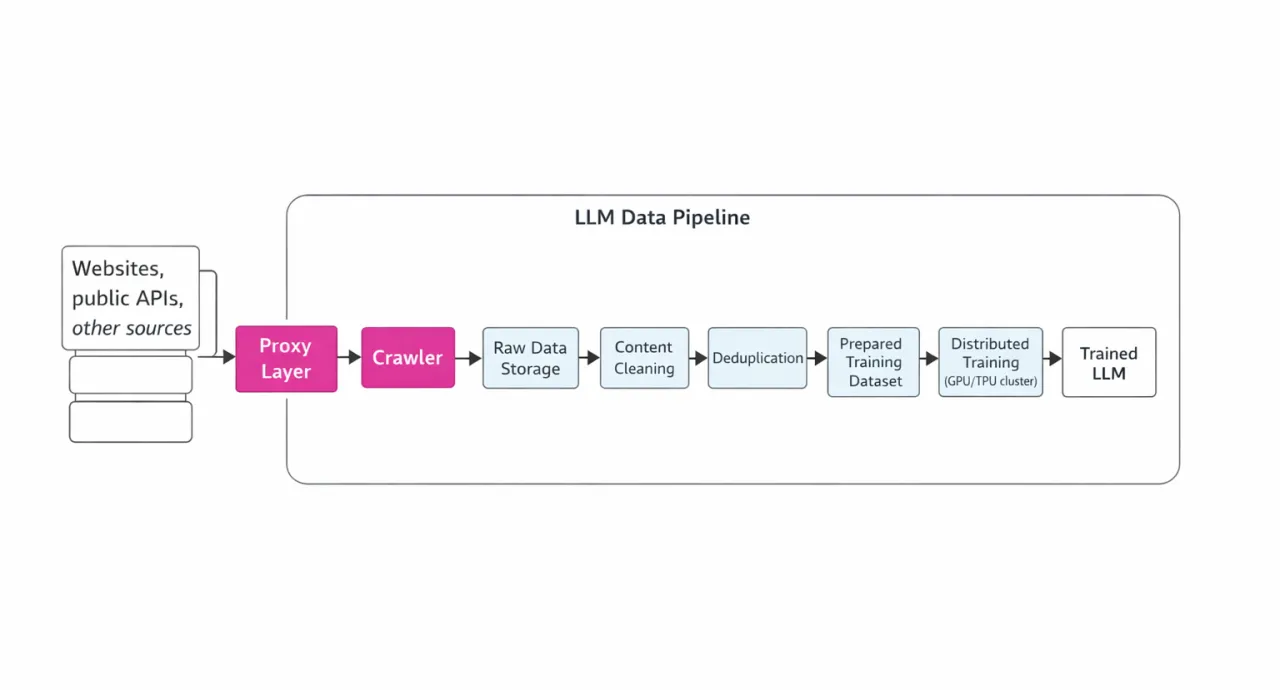
The LLM data processing pipeline includes the following key steps:
-
Crawling – downloading raw HTML/JSON/media over the network;
-
Cleaning – removing HTML templates, ads, and scripts;
-
Deduplication – removing exact and near-duplicate documents;
-
Filtering – selecting by quality, excluding toxic or personal content, languages, etc.;
-
Training – tokenization and training on GPU/TPU clusters. All of these stages require well-designed infrastructure and monitoring.
An illustrative diagram of this pipeline (with a focus on the role of proxies) is shown below:
Crawling and the Role of Proxies
During crawling, it is necessary to send millions of HTTP(S) requests simultaneously to various websites. However, anti-bot protection and IP-based limits often block large-scale scraping campaigns. This is where proxy servers come into play. Proxies allow you to distribute requests across thousands of IP addresses and geolocations, significantly reducing the likelihood of blocks. Rotating proxies are especially important, as they allow continuous data collection without interruptions. Proxies also help simulate requests from real users, preventing detection. Even when accessing APIs (for example, other services or generating synthetic data with LLMs), proxies help distribute load and comply with rate limits.
However, it is important to note: proxies solve technical limitations (IP blocks, rate limits, localization), but they do not bypass legal restrictions. Using proxies does not eliminate the need to comply with robots.txt and applicable laws, so even when using proxies, you should respect website rules and legal requirements when collecting data.
Data Processing (Cleaning, Filtering, Deduplication)
After collecting raw content, the preprocessing stage begins. For example, AWS describes that "the first step in the pipeline is to extract and gather data from various sources and formats (PDF, HTML, JSON, Office documents)", using OCR, HTML parsers, and similar tools. During this stage, unwanted elements (HTML tags, non-English characters) are removed and the text is normalized.
Next, the data is filtered based on various criteria. Recommended filtering patterns include metadata (such as URL or file name), content (excluding toxic or PII content), language, excessive repetition or spam, document length, as well as the use of regular expressions or simple quality classifiers. For example, you might discard texts with undesirable vocabulary or noisy formats, or наоборот keep only documents on specific topics.
After filtering, deduplication is performed: the collected dataset may contain identical or nearly identical documents (rewrites, duplicate HTML pages, etc.). Algorithms such as MinHash or SimHash make it possible to detect exact and near-duplicate copies and remove them. This is important because duplicates degrade training quality (the model simply "memorizes" repeated text).
The final step before training is final cleaning: content classification (quality assessment, removal of toxic fragments, PII). For example, datasets are checked for personal data and inappropriate content is filtered out, ensuring model safety and data consistency. After that, the prepared text corpus is passed to the training stage (tokenization, batching, etc.).
Infrastructure and Distributed Training
Training a large LLM requires clusters with hundreds or even thousands of GPUs/TPUs. Due to GPU memory and compute limitations, different types of parallelism are used – tensor parallelism (splitting model layers across devices), pipeline parallelism (different layers run on different devices sequentially), and data parallelism (a full copy of the model on each device, processing different data batches). This combination (as used in NVIDIA Megatron-LM) allows training to scale to thousands of GPUs. For example, Megatron-LM trained a model with 1 trillion parameters on 3,072 GPUs. The result is over 500 petaflops of effective performance. These systems typically rely on high-speed networking (InfiniBand), servers with large memory, and SSDs for checkpoint storage.
A key component is partitioned data storage (Data Lakes or file systems optimized for big data) – this is where crawling results are stored. Typically, multiple storage tiers are used: cold storage (accessed less frequently) and hot storage (feeding directly into the training pipeline). Cluster monitoring systems (e.g., Prometheus/Grafana) are also essential for tracking GPU utilization, training speed, memory usage, power consumption, and more.
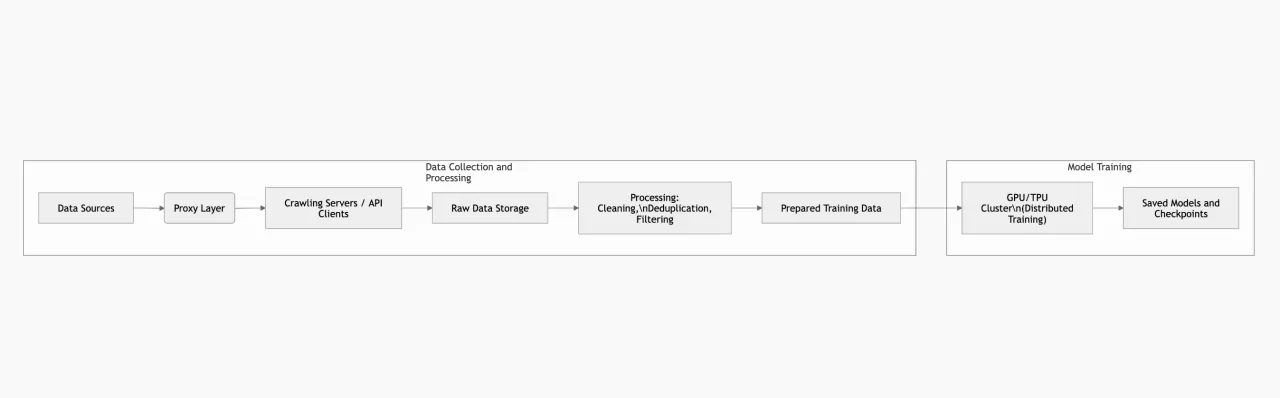
Example of a training architecture: Below is a simplified diagram showing how components interact: data collection via proxies, data transformation and storage, and training clusters. This is just one possible design approach.
Security, Privacy, and Compliance
When working with data for LLMs, it is important to consider ethical and legal requirements. This includes protecting copyrights and personal data, complying with licensing restrictions and GDPR, as well as upcoming AI regulations (for example, the EU AI Act requires transparency and data quality control). Using proxies does not remove responsibility: datasets must be built from publicly available and permitted sources.
The security of the training system itself is also critical. Clusters must be protected from unauthorized access (network firewalls, segmentation), software should be regularly updated, and stored data must be encrypted. Security monitoring (IDS/IPS, request logging) helps detect anomalies in the infrastructure.
Proxy Servers: Types and Characteristics
Main Proxy Types
-
Residential proxies – IP addresses of real users. Websites rarely block them, so their success rate is typically around 95–99%. Today, this is considered the most popular option for LLM training. Residential proxies are ideal where максимально "human-like" traffic is required (social media, protected websites, localized versions). In addition, they allow city-level targeting, which can be important for certain tasks.
-
Mobile proxies – these are proxies with IP addresses from mobile carriers. They are even more anonymous than residential proxies, since websites rarely block them due to multiple users sharing the same IP at the same time. They are typically used when residential proxies are not sufficient or when you need to emulate a mobile user.
-
Datacenter proxies – IP addresses hosted in data centers (AWS, Azure, etc.). They are fast, inexpensive, and provide high bandwidth. However, they are easy to detect: datacenter subnets are often blocked by security systems. Overall success rate on protected websites is around 40–60%, but latency is minimal. This type is suitable for large-scale data collection from websites with low anti-bot protection.
All of these proxy types are typically considered in the context of rotating proxies, which can differ in how frequently the IP address changes. Let’s take a closer look.
-
There are rotating proxies that change the IP after every request or at a defined time interval. These proxies provide high anonymity, since the IP pool can include millions of addresses, all available for use. They are useful for short "fetch-and-forget" requests.
-
Rotating proxies with a fixed IP – these are essentially the same rotating proxies, but the IP address does not change with every request. Instead, it stays the same for as long as possible. They are ideal for multi-step operations (logins, forms, etc.), where changing the IP would trigger re-authentication. In other words, sticky proxies maintain a single IP address for the entire session, simulating a real user session, while standard rotating proxies assign a new IP to each request. Both approaches can be combined depending on the task.
Proxy Performance and Security
Choosing a proxy type is always a balance between speed and reliability. Datacenter proxies lead in throughput (they are 3–4 times faster than residential proxies), but are more frequently blocked. Residential proxies can provide the highest access quality (~99% success rate), but come with higher response times. Mobile proxies are the most expensive and slower, but offer the highest level of trust (carrier-grade networks).
Anti-bot systems rely on a chain of signals: IP, timing, headers, and behavioral fingerprinting. A proxy service mitigates most of these by distributing traffic across IPs and geolocations, and even managing request timing to simulate natural delays. At the same time, proxies do not guarantee perfect success. If the system detects clearly automated behavior, anti-bot protection can still trigger CAPTCHAs.
Integrating Proxies into Data Collection
Implementing a proxy pool in code is a standard task. For example, in Python using the requests library, you can configure proxies like this:
import requests
proxies = {
"http": "http://user:pass@proxy.example.com:port",
"https": "https://user:pass@proxy.example.com:port",
}
response = requests.get("http://example.com", proxies=proxies)
For long sessions (for example, with authentication), you can use requests.Session() and reuse the same proxy, or specify a session_id or sticky parameter at the service level. In frameworks like Scrapy, there is middleware for proxy rotation: you provide a list of IPs and Scrapy cycles through them automatically while controlling request rates. In browser automation tools (Selenium, Playwright), proxies are passed via browser settings (--proxy-server=http://host:port).
It is important to choose the right authentication model. Proxy services typically support:
-
Username:password (Basic Auth) – the standard for HTTP/HTTPS proxies (as shown above).
-
API key/token – used to access services (often via HTTP headers).
-
IP allowlisting – some providers let you whitelist your servers so proxies can be used without authentication.
Monitoring and Optimization of Data Collection
To ensure a stable data pipeline, it’s important to track key metrics:
-
Request Success Rate: the percentage of requests that return valid data instead of errors (4xx/5xx). Ideally, this should be above 95% for target domains.
-
Latency: average response time, as well as p90 and p99. For residential proxies, these values are higher due to the last-mile factor, but they typically have more consistent latency.
-
Status Codes: track the number of 403/429 and 5xx responses by host and ASN. A sudden increase in 403 errors for a specific IP pool usually indicates that the subnet is being blocked.
-
Session Retention: how long sessions remain active without requiring re-login. This metric is closely tied to the use of sticky sessions.
-
Throughput: GB/sec during crawling – important for estimating costs (GPU time is often cheaper than storing 20+ copies of HTML pages). It’s also recommended to monitor 5-minute TLS handshake success rates – close to 100% indicates a healthy IP pool.
Any data collection system must be resilient to failures: return empty results when needed, retry requests with backoff, and track error rates for each proxy. For example, you can limit the number of requests per IP per domain and adjust based on 403/429 responses, respect Retry-After headers, and replace "burned" IPs.
Top 5 Proxy Providers for LLM Tasks
Below is a comparison table of five proxy providers that are often mentioned in the context of AI/LLM workloads (based on availability of residential and mobile pools, scalability, and data collection capabilities). For each provider, we include proxy types, geographic coverage, authentication methods, pricing model, and anti-blocking features.
| Provider | URL | Proxy Types | Geo Coverage | Throughput / Latency | Authentication Methods | Pricing Model (Residential proxies) | Anti‑Bot Features | Pros / Cons |
|---|---|---|---|---|---|---|---|---|
| NodeMaven | https://nodemaven.com/ | Residential, Mobile | 150+ countries, 1400+ cities globally | High (clean IPs & sticky sessions) | Login/Password, IP whitelist | Pay‑as‑you‑go & monthly plans ($2.86-$6.18/GB) | Sticky sessions up to 24 h, IP quality filter | Pros: high quality clean IPs, sticky sessions, geo‑targeting. Cons: pricing can be higher than budget alternatives. |
| BrightData | https://brightdata.com/ | Residential, Datacenter, Mobile | 195+ countries, extensive global pool | High (enterprise grade) with large IP network | Login/Password, API keys | Bandwidth‑based pricing ($5–$8/GB pay‑as‑you‑go, larger monthly bundles) | Advanced CAPTCHA bypass & session control | Pros: huge IP pool, best for enterprise, flexible targeting. Cons: complex pricing, expensive for small use. |
| ProxyScrape | https://proxyscrape.com/ | Datacenter, Residential | 55M+ residential IPs, global coverage (195 countries) | Medium (large but more generic pool) | API keys, possible login credentials | Flexible plans ($1.5-$4.85) | Basic IP rotation | Pros: affordable & flexible. Cons: quality varies by pool & region. |
| ProxyEmpire | https://proxyempire.io/ | Residential, Mobile, Datacenter | Global coverage (millions of IPs) according to provider claims | Medium‑High (optimized rotational pools) | Login/Password | Pay‑as‑you‑go (e.g., $3.5/GB start) & small plans | Rotating IPs & session controls | Pros: flexible rotation settings, good for mixed workloads. Cons: pool smaller than top‑tier enterprise providers. |
| DataImpulse | https://dataimpulse.com/ | Residential, Mobile, Datacenter | 100+ countries, multi‑region support | Medium (solid network, affordable) | Login/Password | Pay‑as‑you‑go (often ~$1/GB residential) | Basic IP rotation | Pros: very affordable, multiple proxy types. Cons: smaller IP pool compared to giants. |
Note on pricing. Proxy service pricing can vary significantly: datacenter proxies typically cost fractions of a dollar per GB, while residential and mobile proxies can cost several dollars or more per GB. Pricing models usually include bandwidth-based (pay-as-you-go/GB) or per-IP subscriptions. For large-scale operations, it is often more cost-effective to use a hybrid model (IP-based for stable sessions + GB-based for high-volume requests).
Monitoring and Performance Measurement
To ensure data quality and training efficiency, the following metrics should be tracked:
-
Data quality: the percentage of valid, non-empty, and uncorrupted results. For LLMs, it is critical that collected text is meaningful and relevant.
-
Coverage: the number of collected pages/documents and the breadth of coverage (different domains, languages, regions).
-
Collection speed: documents per day, including average request latency through proxies.
-
Training metrics: after training – perplexity, validation accuracy, and loss function trends. Strong results indicate that the data pipeline is working correctly.
-
Proxy metrics: success rate (retries and failures), latency percentiles (p50/p90), number of active sessions, and blocked IPs.
It is also recommended to monitor the Handshake Success Rate (TLS; close to 100% indicates healthy IPs) and the distribution of response codes (403/429) across Autonomous Systems. A lower success rate (for example, frequent proxy authentication failures) indicates poor connection quality.
Cost Optimization
Even without strict budget constraints, it is important to optimize costs:
-
Buy based on needs: choose between pay-as-you-go or monthly subscription models. Monthly plans are typically cheaper, so if you know your expected usage, they are usually more cost-effective.
-
Balance proxy types: assign high-priority targets to residential proxies and less critical ones to datacenter proxies to reduce costs.
-
Use alternative data sources: where possible, rely on scraper APIs or existing datasets (e.g., Common Crawl, Wikipedia SQL dumps) to reduce the need for scraping. This can significantly lower proxy usage.
-
Optimize the data pipeline: reduce the amount of data entering training (deduplication, pre-filtering) to save GPU resources. For example, if you collect 1 TB of data via proxies but only 100 GB remains after deduplication, you effectively save ~90% of compute costs.
Conclusion
Training LLMs is a complex process that requires powerful infrastructure, a well-designed data pipeline, and specialized tools. Proxy servers play a critical role in the data collection stage by enabling scalability, diversity, and a continuous flow of fresh data into the model. Choosing the right proxy types (residential, datacenter, mobile) and modes (rotating vs sticky) is crucial for success.
We recommend approaching LLM system design as an engineering problem: segment data flows based on session and trust requirements, implement monitoring for proxy and data health, and iteratively refine rotation and retry strategies. Using high-quality proxy providers (as listed above) will ensure a high crawling success rate. Most importantly, remember that the true cost of a model is not just GPU time, but also the completeness and quality of the data. A balanced combination of fast access and "human-like" traffic patterns collected through proxies will significantly improve final training outcomes.