Our editorial team at Caproxy supports a free and open internet, and in this article we will explain how to bypass Telegram blocks in countries with the strictest internet censorship, such as Russia, China, Iran, and others. Please note that we are specifically talking about bypassing a Telegram block imposed by a country's authorities, not a situation where your account has been blocked by Telegram itself for violating the platform's rules.
The Nature of the Problem
People living in countries with restricted internet access know very well that bypassing blocks is becoming increasingly difficult, as governments invest enormous resources to prevent access to Telegram and other websites. In the past, a simple VPN was often enough and worked very well. However, as of 2026, blocking algorithms have become much more sophisticated. They no longer just block the target domain, but also analyze your traffic to determine whether you are using a VPN or proxy.
It is important to understand that modern traffic filtering systems are no longer limited to simple IP filtering. Many countries use DPI (Deep Packet Inspection), which analyzes traffic signatures, meaning the distinctive "fingerprints" of protocols that make it possible to determine what is being transmitted over the network. This is why you may often experience problems accessing Telegram when using proxies with the SOCKS5 protocol or popular VPN services, especially free ones.
Ways to Bypass Telegram Blocks
In general, in 2026, as efforts to block Telegram in countries with strong censorship have intensified, there are two ways to bypass the block:
- Use the MTProto protocol (costs approximately $1.5 per month).
- Use a specialized VPN that can handle strict censorship (costs $4.5 per month).
Which option should you choose? It all depends on whether you also need access to websites other than Telegram. If yes, choose a VPN. If you only need access to Telegram, choose MTProto. Below, we will explain each option in more detail.
MTProto Proxies
These are proxies developed specifically by the Telegram team. Unlike SOCKS5, they are encrypted and disguised as regular HTTPS traffic, which reduces the likelihood of being blocked based on traffic signatures and makes the connection appear more "neutral" to filtering systems.
Therefore, if you only need to bypass Telegram blocks, an MTProto proxy is an excellent low cost solution.
We covered this protocol in more detail in a separate article: MTProto Proxy: Where to Buy and How to Set It Up. Below, you will find a simplified version of that article, and if this information is not enough, we recommend reading the full guide.
Where to Buy MTProto Proxies?
You can purchase them from proxy providers. Below, you will find proxy providers as well as mirror websites in case the main websites are unavailable for any reason. Since MTProto is a highly specialized protocol, there are not many providers offering it, but there are still several good options.
- Proxyline costs $1.77 per month. The price depends on the purchase period, and plans are available from 5 to 365 days. With the promo code CAPROXY, you can get a 10% discount on your proxy purchase. In our opinion, this is the best overall option in terms of price and quality. It offers a wide selection of MTProto proxy locations, and customer support responds quickly.
- Mirror 1: SpaceProxy (Use promo code CAPROXY for a 10% discount)
- Mirror 2: TakeProxy (Use promo code ayVRtQrp9jqdPIKOC45 for a 5% discount)
- Mirror 3: ProxyStores (Use promo code CAPROXY for a 10% discount)
- Mirror 4: OnlyProxy (Use promo code JHH3WlslMwJCQR0zBFS for a 5% discount)
- Proxy6 costs $1.13 per month. The price depends on the purchase period, and plans are available from 7 to 90 days. This is the cheapest option, but there are quite a few negative reviews regarding proxy quality and customer support. However, if you are looking for the lowest cost option, this may be a suitable choice. With the promo code CAPROXY, you can get a 5% discount on your proxy purchase. If the Proxy6 website is unavailable, use their mirror PX6 (Use promo code CAPROXY for the same 5% discount).
- ProxyWing costs from $1.15 to $2.0 per month. The price depends on the number of proxies in your order, and the minimum purchase period is 30 days. One advantage is the ability to pay with a bank card issued in any country or through PayPal, although an additional fee of about 5% applies.
How to Set Up MTProto Proxies?
After purchase, you will receive the following information:
- Server address
- Port
- Secret key
We covered in a separate article how to add a proxy in Telegram and the process is almost the same except for the proxy data. Here is a short step by step guide on how to add a proxy in the Telegram messenger:
Step 1: Open the Telegram mobile application.
Step 2: Go to Settings and select "Data and Storage".
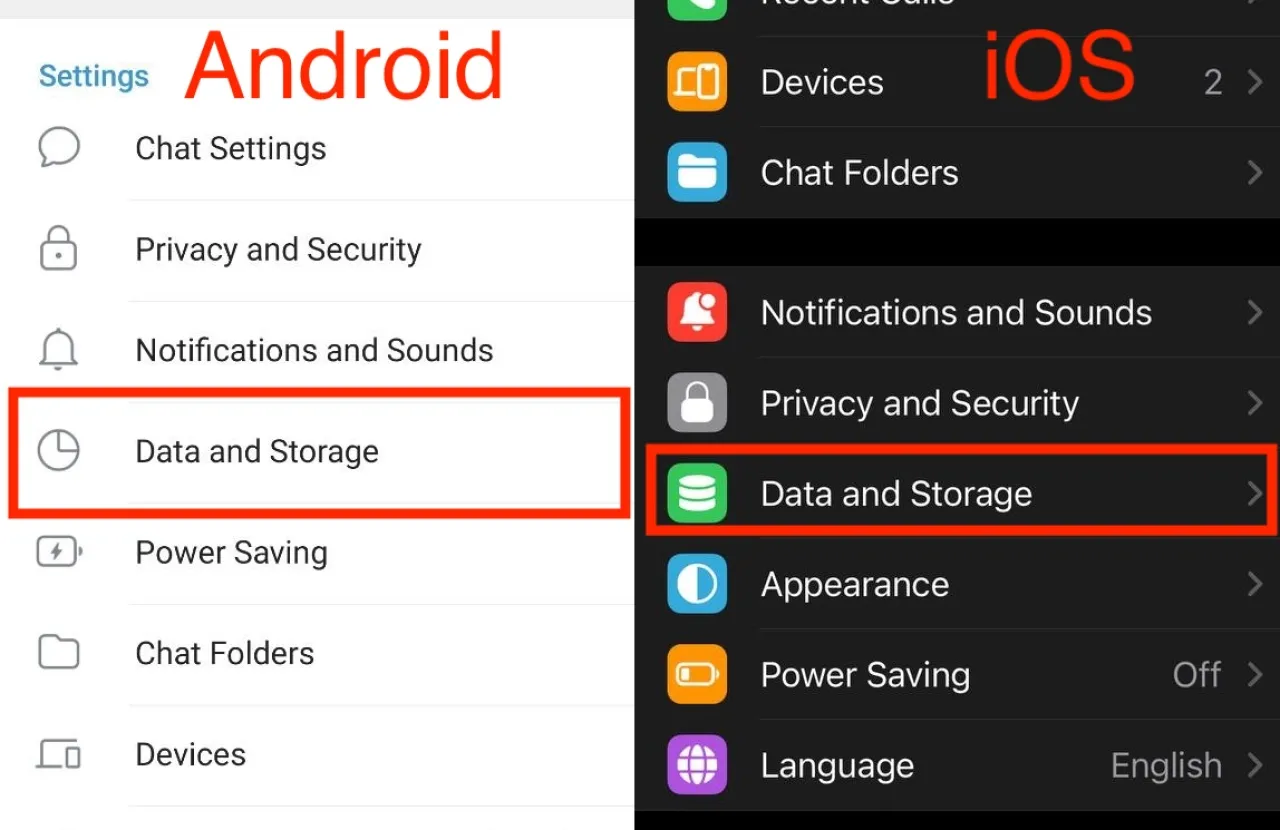
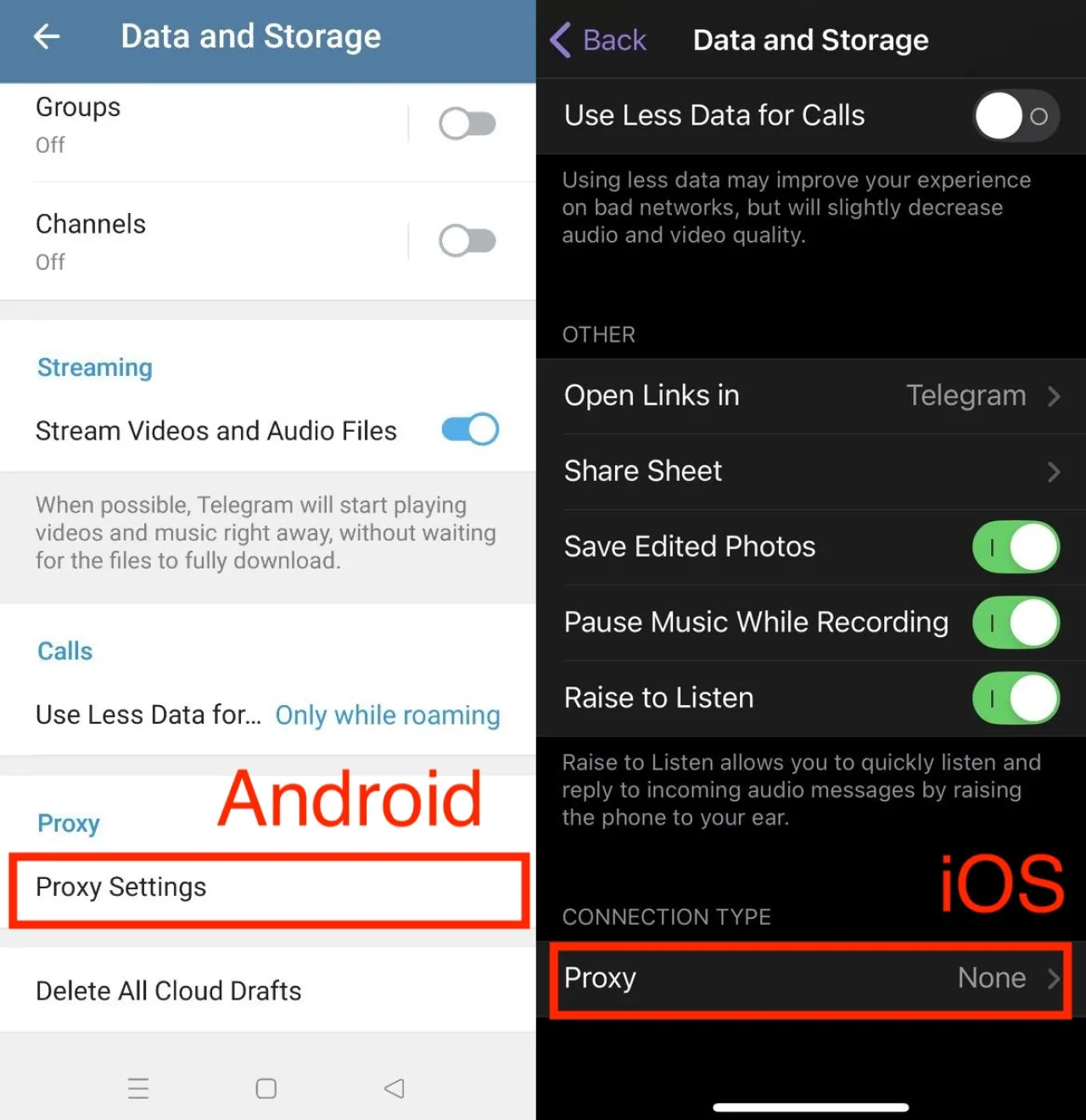
Step 3: Scroll to the very bottom and select "Proxy Settings" on Android or "Proxy" on iOS.
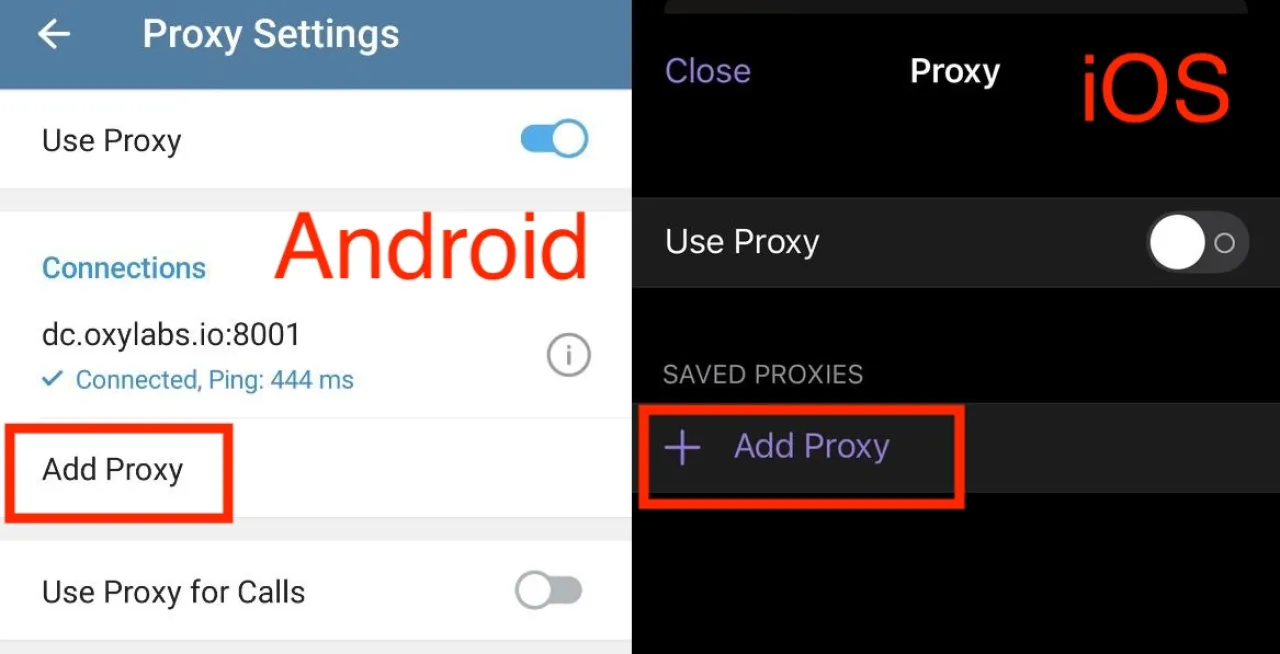
Step 4: Click "Add Proxy" and a page will open where you can add a proxy.
Step 5: Enter the data for the MTProto proxy:
- Server address
- Port
- Secret key
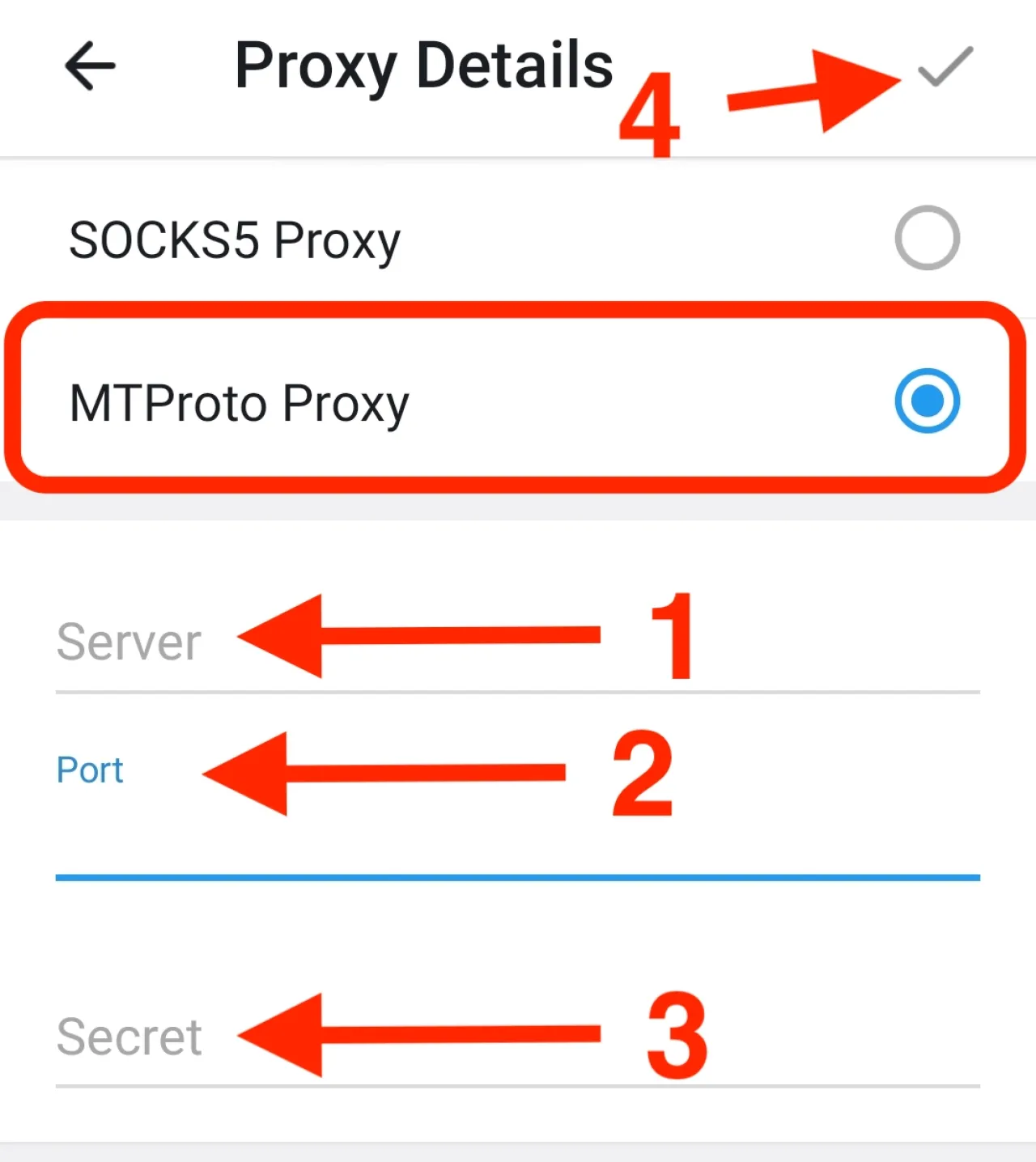
Done! You have added a proxy, and now Telegram will try to establish a connection with the proxy you added. If the connection is successful, congratulations, you have added a proxy to Telegram!
Final Thoughts on MTProto Proxies
This option is ideal if you only need access to Telegram. It is several times cheaper than purchasing a VPN and works very well even under the strictest blocking conditions.
However, there is one drawback. MTProto proxies only work for messaging and do not support voice or video calls. The reason is that MTProto proxies operate at the TLS protocol level, while calls use the UDP protocol. If the country you are in also blocks voice and video calls, MTProto proxies will not help.
Therefore, if voice and video calls on Telegram are also important to you, you should use a VPN, which we will discuss next, or try the advanced configuration that we covered at the end of this article: MTProto Proxy: Where to Buy and How to Set It Up.
VPN for Telegram
Not all VPN services are capable of bypassing blocks in countries with strict censorship. Therefore, you should use specialized VPN services to access Telegram.
If proxies are not a suitable option for you, you can use Amnezia with the premium version. If the Amnezia website is unavailable, use the alternative link here. This VPN may be slightly more difficult to set up, but it is highly effective at bypassing restrictions.
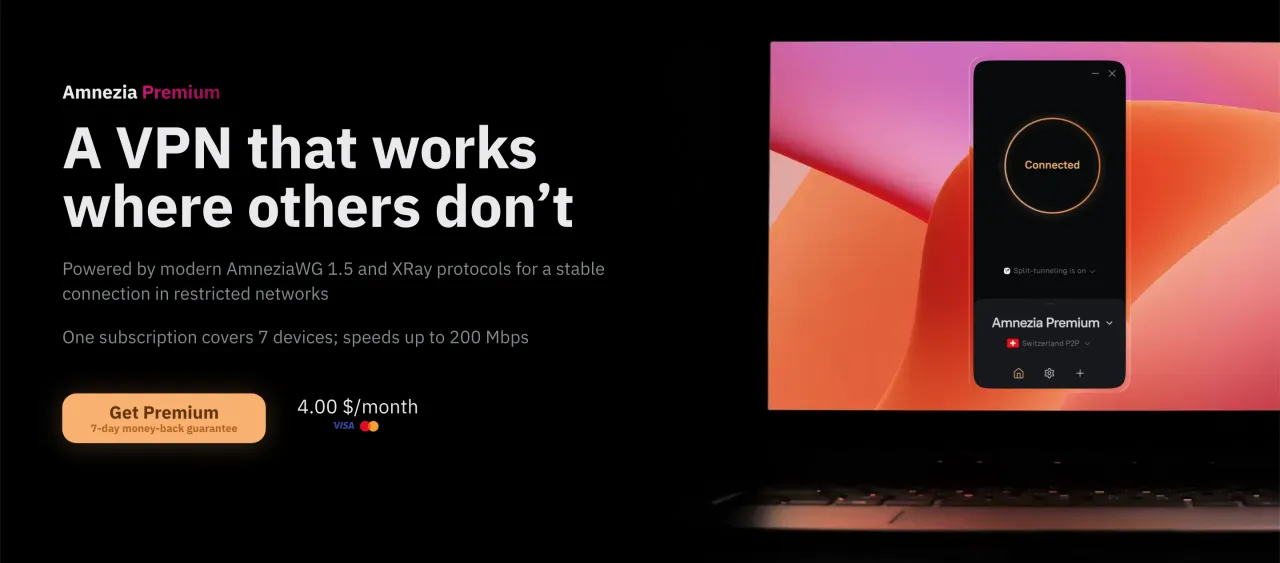
Subscriptions are available for 6 or 12 months, and payment can be made by card or cryptocurrency. The cost is $28 for 6 months ($4.66 per month) or $48 for 12 months ($4 per month). You can connect up to 7 devices, and speeds are up to 200 Mbps. The main advantage of Amnezia is that it uses a proprietary algorithm specifically designed to bypass strict censorship. The team also releases updates quickly and finds new solutions if blocking becomes even more aggressive.
Conclusion
In this article, we covered two main methods that are highly reliable for accessing Telegram if it is blocked in your country. The right choice depends on whether you need access only to Telegram or also to other websites, and whether voice and video calls in Telegram are important to you if they are also blocked in your country.
We hope this article will be helpful, because today it is more important than ever to have free access to independent information and to stay in touch with family and friends.
FAQ
- Can I access Telegram if the government has blocked it?
- Yes. Your account will still work as usual. The restriction only prevents your internet provider from connecting you to Telegram's servers directly.
- What is the most budget friendly way to unblock Telegram?
- If you only need chats, channels, and file sharing, an MTProto proxy is usually enough. It is inexpensive and takes just a few minutes to set up.
- Do I really need a VPN?
- Only if you want more than Telegram. A VPN is useful when other websites are blocked as well or when you rely on voice and video calls inside the app.
- Will Telegram calls work through an MTProto proxy?
- In many cases, no. Messaging works well, but calls may fail because they use a different type of network connection.
- Why did my old VPN stop working?
- Some countries regularly update their filtering systems. A VPN that worked last month may become detectable and stop connecting properly.
- Are free VPN apps worth trying?
- You can test them, but they rarely remain usable for long in countries with strict censorship. Paid services tend to be much more stable.
- How much does a working solution usually cost?
- For Telegram only, you can often solve the problem for around one or two dollars per month. A specialized VPN usually costs several dollars more.
- Can I use the same VPN on my phone and computer?
- Yes. Most providers allow several devices to be connected under one subscription, which is convenient if you use Telegram on more than one device.
- What if the provider's website is blocked too?
- Check whether the company offers a mirror website. These backup domains are created specifically for users in restricted regions.
- What do most people choose?
- People who only want to read messages and stay in touch often choose MTProto. Those who also need calls and access to blocked websites usually go with a specialized VPN.