Last updated: 2026-04-24
In this article, we will take a detailed look at the MTProto proxy protocol, which was specifically developed for Telegram. You will learn what this protocol is, its key features, where you can purchase it, and how to set it up in Telegram. We will also cover a very important topic in this article, how to configure calls and video calls through a proxy so that they work as well, since by default they do not go through the proxy.
The topic is quite specific, but highly relevant for bypassing regional restrictions in countries where Telegram is blocked or limited, as well as if you need increased anonymity when interacting with the Telegram messenger.
Information about MTProto
MTProto is a proprietary protocol developed by Telegram. Unlike classic proxies such as SOCKS5 or HTTP, it is not a universal solution and is used exclusively for connecting to Telegram.
The main goal of MTProto is to provide a stable and unnoticeable connection to Telegram servers even under blocking conditions. The protocol disguises traffic as regular HTTPS, making it harder to detect and block at the provider level.
It is important to understand that modern traffic filtering systems are no longer limited to simple IP filtering. In many countries, DPI Deep Packet Inspection is used, which analyzes traffic signatures, specifically the characteristic fingerprints of protocols that allow identifying what exactly is being transmitted over the network.
When it comes to MTProto, obfuscation plays an important role, meaning hiding the structure of the traffic. The connection appears as regular encrypted HTTPS traffic without obvious signs of a proxy protocol. This reduces the likelihood of signature based blocking and makes the connection more neutral for filtering systems.
Features of MTProto proxies:
- Works only with Telegram and is not suitable for browsers or other applications
- Uses a TCP connection
- Supports traffic encryption via a special secret key
- Obfuscates traffic by disguising it as regular HTTPS
- Helps bypass blocks, including DPI filtering and signature analysis
- Usually performs more reliably under censorship conditions than SOCKS5
It is also worth considering that Telegram may partially limit or block public MTProto proxies, so for stable performance it is recommended to use private paid solutions.
Where to buy MTProto proxies
As we mentioned earlier, the MTProto protocol is quite specific and is intended only for Telegram, so very few proxy providers offer proxies with the MTProto protocol, but they do exist. In general, there are two ways to get a proxy:
- Buy a VPS server and create a proxy yourself
- Buy ready made proxies from a proxy provider
We will focus on the second option, since it does not require technical skills, is much easier, and is usually cheaper than buying a server. Let’s take a look at three main proxy providers that offer MTProto proxies for Telegram.
1. ProxyLine
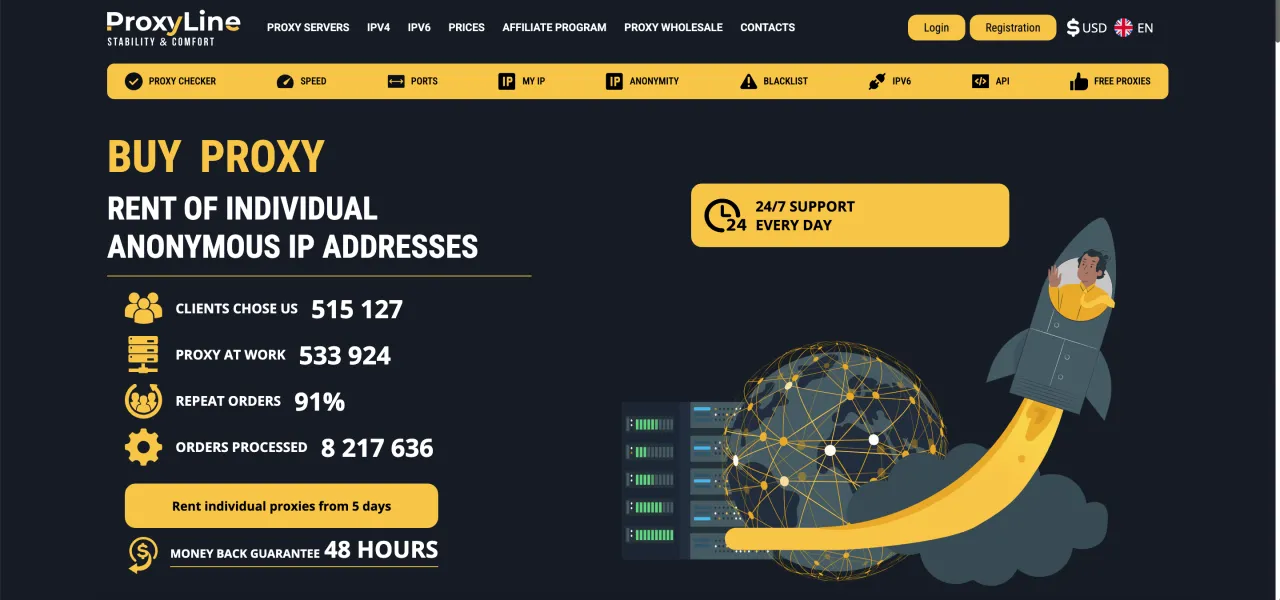
Official website: https://proxyline.net/
They offer high quality proxies at a relatively low price with a wide selection of countries. The purchase process is convenient and intuitive, and their support responds very quickly. With the promo code CAPROXY you can get a 10% discount on proxy purchases.
Price: $1.77 per month. The price depends on the purchase period.
Purchase period: from 5 days to 360 days.
Important. If for some reason ProxyLine is not accessible, here are four mirror sites that belong to this proxy provider. You can also purchase MTProto there:
- SpaceProxy (With promo code CAPROXY 10% discount)
- TakeProxy (With promo code ayVRtQrp9jqdPIKOC45 5% discount)
- ProxyStores (With promo code CAPROXY 10% discount)
- OnlyProxy (With promo code JHH3WlslMwJCQR0zBFS 5% discount)
2. Proxy6
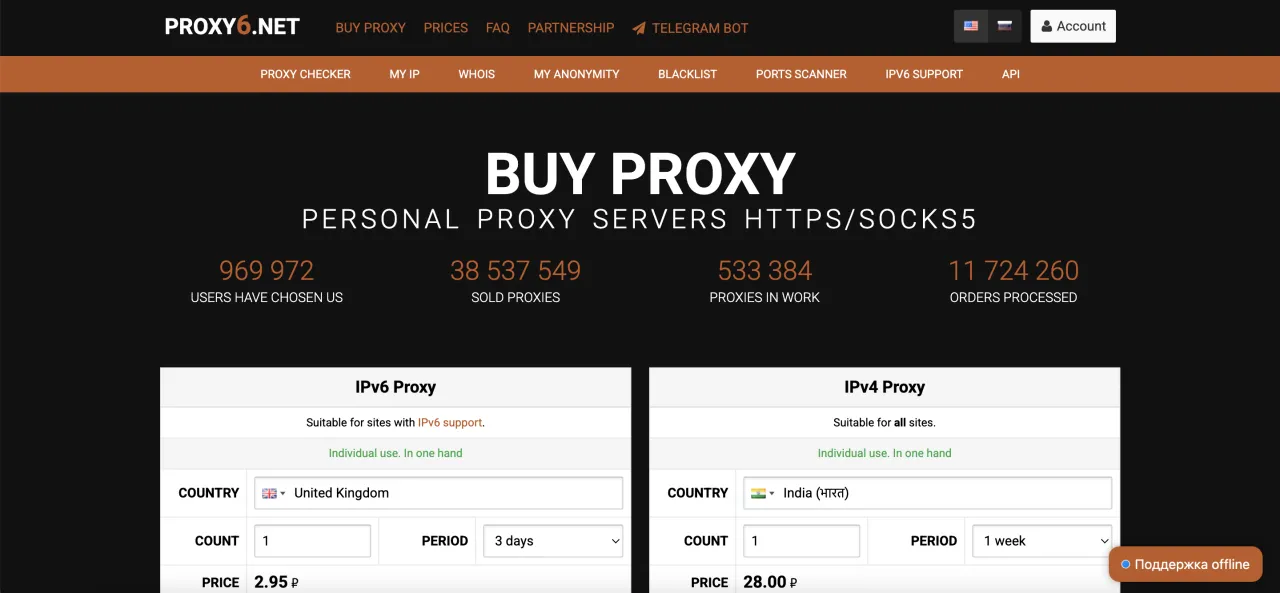
Official website: https://proxy6.net/
The price is slightly lower than ProxyLine, but the selection of countries is smaller, and there are quite a lot of negative reviews about proxy quality and their support service. If affordability is your priority, then Proxy6 will be a good option. It is also important to note that the Proxy6 balance is in rubles, which may be slightly inconvenient.
With the promo code CAPROXY you can get a 5% discount on proxy purchases.
Price: $1.13 per month. The price depends on the purchase period.
Purchase period: from 7 days to 90 days.
Important. If for some reason Proxy6 is not accessible, here is a mirror that belongs to this proxy provider: PX6 With promo code CAPROXY 5% discount
3. ProxyWing
Official website: https://proxywing.com/
ProxyWing also offers proxies with the MTProto protocol for Telegram. The proxies are high quality, the support is excellent, and in terms of pricing, if you need two or more proxies, then ProxyWing offers a good balance between price and quality. One of the advantages is the ability to pay with a bank card from any country or via PayPal, although there is an additional fee of about 5%.
Price: $1.15 to $2.0 per month. The price depends on the number of proxies in the order.
Purchase period: 30 days.
Setting up MTProto proxy
After purchase, you will receive the following information:
- Server address
- Port
- Secret key
We covered in a separate article how to add a proxy in Telegram and the process is almost the same except for the proxy data. Here is a short step by step guide on how to add a proxy in the Telegram messenger:
Step 1: Open the Telegram mobile application.
Step 2: Go to Settings and select "Data and Storage".

Step 3: Scroll to the very bottom and select "Proxy Settings" on Android or "Proxy" on iOS.

Step 4: Click "Add Proxy" and a page will open where you can add a proxy.

Step 5: Enter the data for the MTProto proxy:
- Server address
- Port
- Secret key
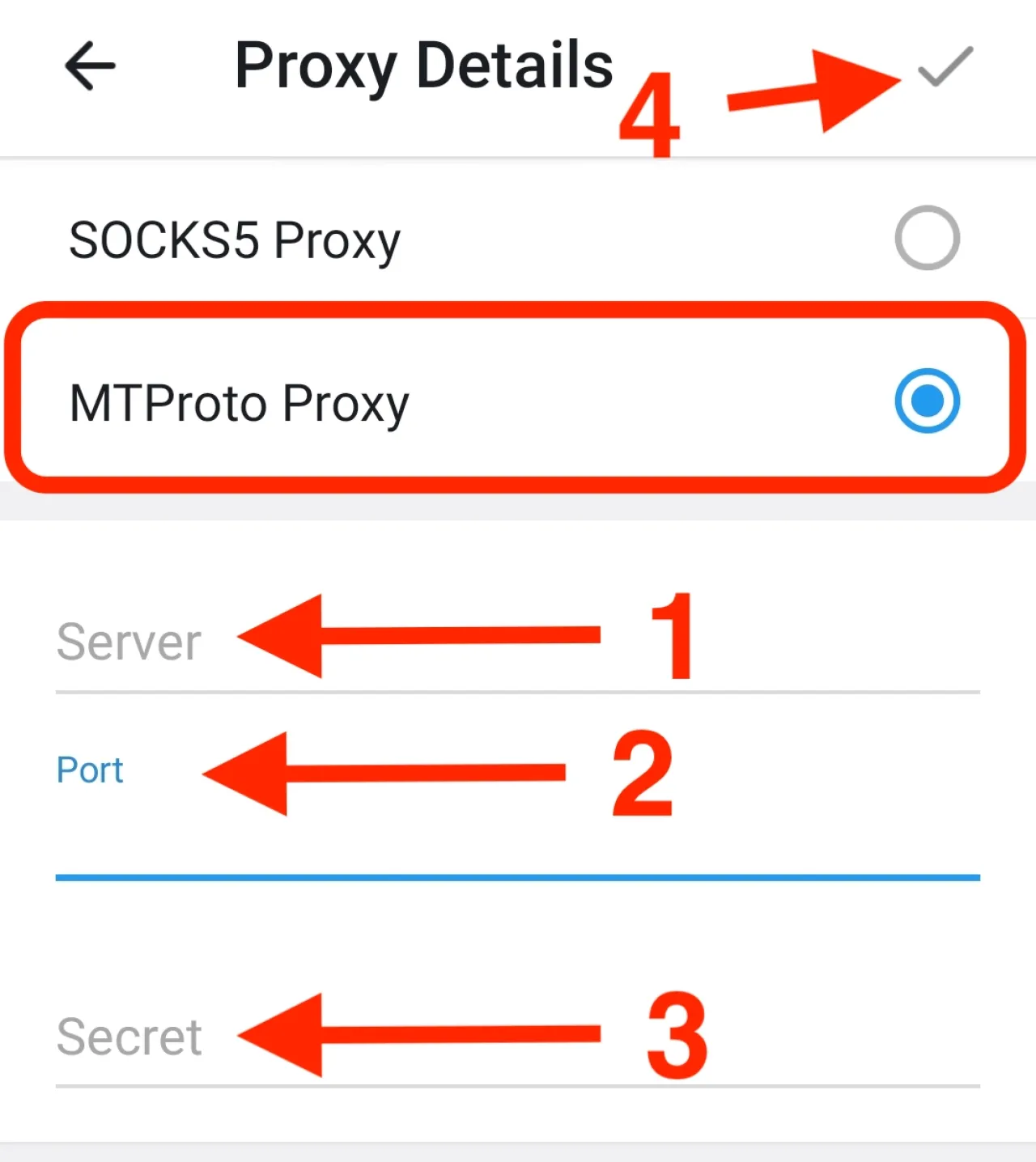
Done! You have added a proxy, and now Telegram will try to establish a connection with the proxy you added. If the connection is successful, congratulations, you have added a proxy to Telegram!
Setting up calls and video calls through a proxy
If calls and video calls do not work by default, it means that Telegram is blocked in your country.
The issue is that calls use the UDP protocol, while MTProto works only over the TCP protocol. In simple terms, when you add an MTProto proxy in Telegram, it only works for messaging, but calls ignore the proxy because they use the UDP protocol.
Solution?
We cannot guarantee that this will work in your case, but here are several options:
-
You can try proxies with the SOCKS5 protocol. However, if Telegram is blocked in your country, then most likely SOCKS5 proxies will not work.
-
Enable the Force TCP option for calls, but this works only on Android.
-
Go to Telegram settings
-
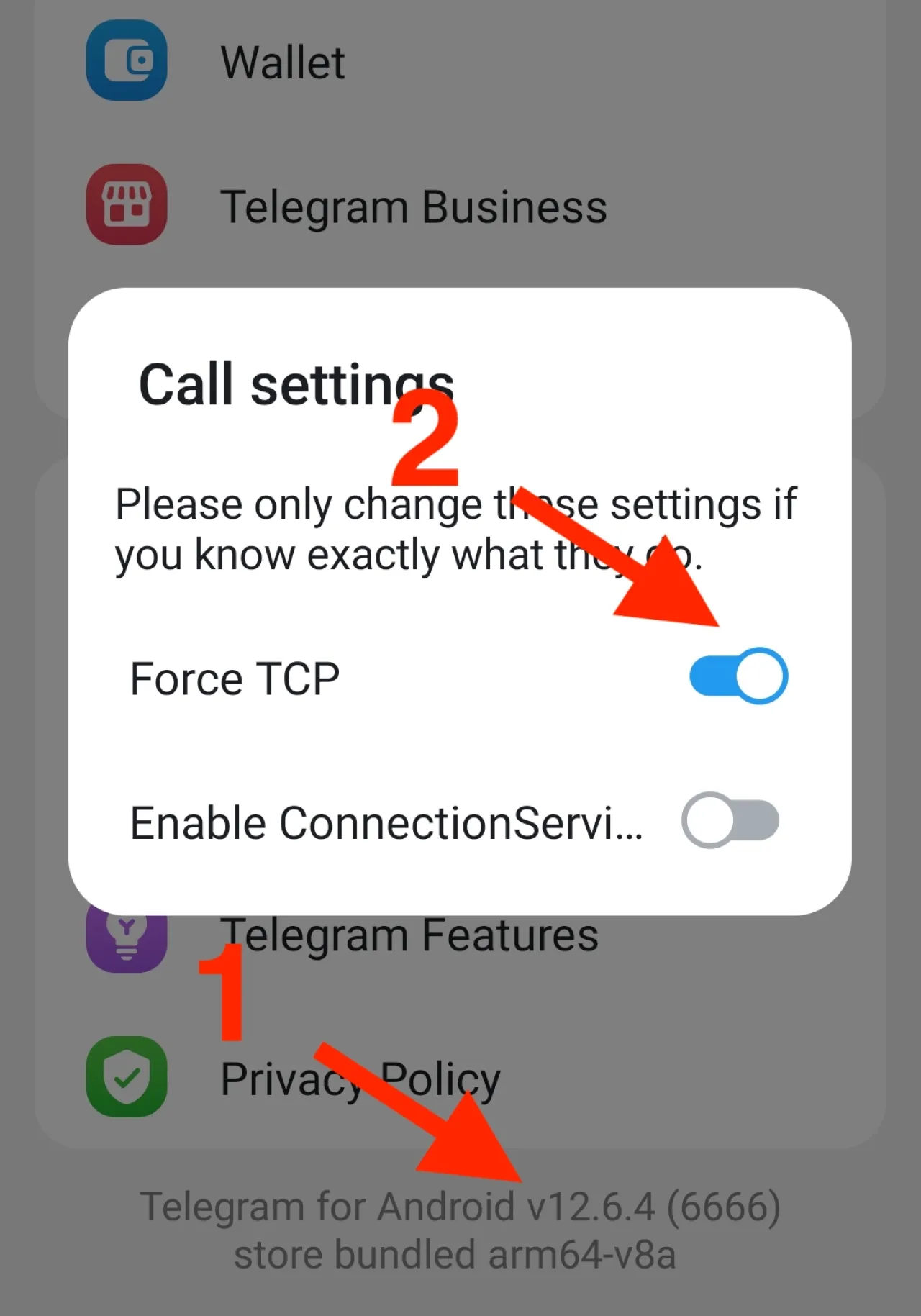
Scroll to the very bottom where the Telegram version is shown
-
Press and hold on the Telegram version twice to open the hidden menu
-
Select the Call Setting option
-
Enable the Force TCP option and tap anywhere outside the window to close it
-
This setting must be enabled on both devices, and you also need to close the Telegram app and then open it again
-
-
Use specialized VPNs to bypass strict censorship. If proxies did not work for you, you can use Amnezia with the premium version. If the site is not accessible, follow this link here. This type of VPN may be slightly more difficult to set up, but it can reliably bypass restrictions.
Conclusion
MTProto proxies are a simple and effective way to access Telegram under blocking conditions, as they do not require complex setup and are suitable for regular use of the messenger. In practice, there are two options, you can either set up your own VPS or buy a ready made proxy from a provider. Most users choose the second option because it is faster and easier. After purchase, everything comes down to adding the server, port, and secret key into Telegram, and you can follow the instructions above. The proxy starts working immediately, but it is important to note that calls and video calls may not work, since they use a different type of connection based on the UDP protocol.
FAQ
- What exactly is an MTProto proxy?
- It is a connection method created by Telegram itself that lets the app reach its servers even when access is restricted, while making the traffic look like обычный HTTPS.
- Can I use this type of proxy outside of Telegram?
- No, it is tied only to Telegram, so it will not work in a browser or with other apps.
- Why do people choose MTProto instead of SOCKS5?
- In countries with strong filtering, MTProto tends to connect more reliably because its traffic is harder to recognize and block.
- Does it protect my data?
- Yes, the connection uses encryption with a secret key, so the traffic is not sent in plain form.
- Why do calls not go through the proxy?
- Telegram calls use a different protocol called UDP, while MTProto works through TCP, so they do not overlap.
- Is there any workaround for calls?
- On Android, some users enable the hidden Force TCP option, which sometimes helps, although it is not guaranteed.
- Are free MTProto proxies worth using?
- In most cases they are unstable or quickly blocked, so people usually switch to private options.
- What are the ways to get one?
- You can either set everything up yourself on a VPS or just buy a ready to use option from a provider.
- What details do I need to connect?
- You will be given three things, the server address, the port, and a secret key that you enter in Telegram.
- What if nothing works at all?
- In that case, people often try a different approach, for example switching to a VPN that is designed for bypassing heavy restrictions.