Socks.Market rents out single live addresses by the day: a home line (WiFi) or a phone line (LTE) that you pick yourself, hold for 24 hours and run without any traffic counter, from $0.4 a day for a shared IP. Prices verified in October 2026. That puts it between the two things everybody else sells, because the address comes out of a rotating pool but is pinned to you for a day, and bandwidth is not metered.
The compromise is written into the model. You get an unlimited day on a genuinely residential or mobile address, chosen down to the city, carrier and ZIP, and in exchange you accept that the device belongs to a stranger who can go offline at any moment. Money comes back only in the first hours and only if you have barely used the proxy, so the cheap part of the purchase is the part where you test it.
Pricing
- Rotation Residential Proxies
- Rotation Mobile Proxies
Specifications


Proxy Type
- Mobile Proxies
- Residential Proxies
- Rotation Residential Proxies
- Rotation Mobile Proxies
Available Countries
- United States
- United Kingdom
- Germany
- France
- Canada
- Brazil
- India
- Spain
- Italy
- Australia
- Turkey
- Mexico
- Argentina
- Austria
- Barbados
- Colombia
- United States
- United Kingdom
- Germany
- France
- Canada
- Brazil
- India
- Spain
- Italy
- Australia
- Turkey
- Mexico
- Argentina
- Austria
- Barbados
- Colombia
- United States
- United Kingdom
- Germany
- France
- Canada
- Brazil
- India
- Spain
- Italy
- Australia
- Turkey
- Mexico
- Argentina
- Austria
- Barbados
- Colombia
- United States
- United Kingdom
- Germany
- France
- Canada
- Brazil
- India
- Spain
- Italy
- Australia
- Turkey
- Mexico
- Argentina
- Austria
- Barbados
- Colombia
Interface Language
- English
Payment Methods
 Crypto
Other Features
- Residential and mobile IPs by the day
- Unlimited traffic per IP
- Country, city, ISP and ZIP selection
- SOCKS5 with UDP filter
- Instant activation after purchase
- Purchases through a Telegram bot
- Crypto payments
Top 9 alternatives for Socks.Market






Our Review

What Socks.Market actually sells
The market mostly sells three things, and this is none of them. A rotating pool hands you a new address on every request and bills the gigabyte. A static ISP address gives you one IP for a month, taken from provider ranges announced out of hosting. A mobile port gives you a modem for a month at a port price.
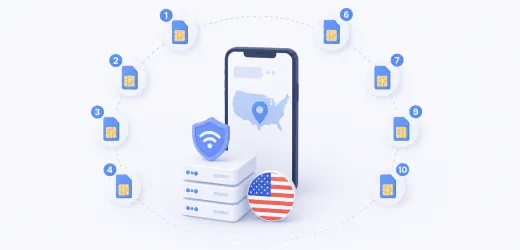
Here you buy one specific address out of a live pool and keep it for 24 hours, with no traffic meter running. The address sits on somebody's home router (WiFi) or phone (LTE), so its nature is residential or mobile, not hosting. The unit of sale is a day. In effect you get a static residential IP for 24 hours, not for a month.
That is the whole product.
Two things follow from it. You choose the address before you pay, across 24 countries. And the device is not yours and never will be, so the address lasts exactly as long as its owner stays online.
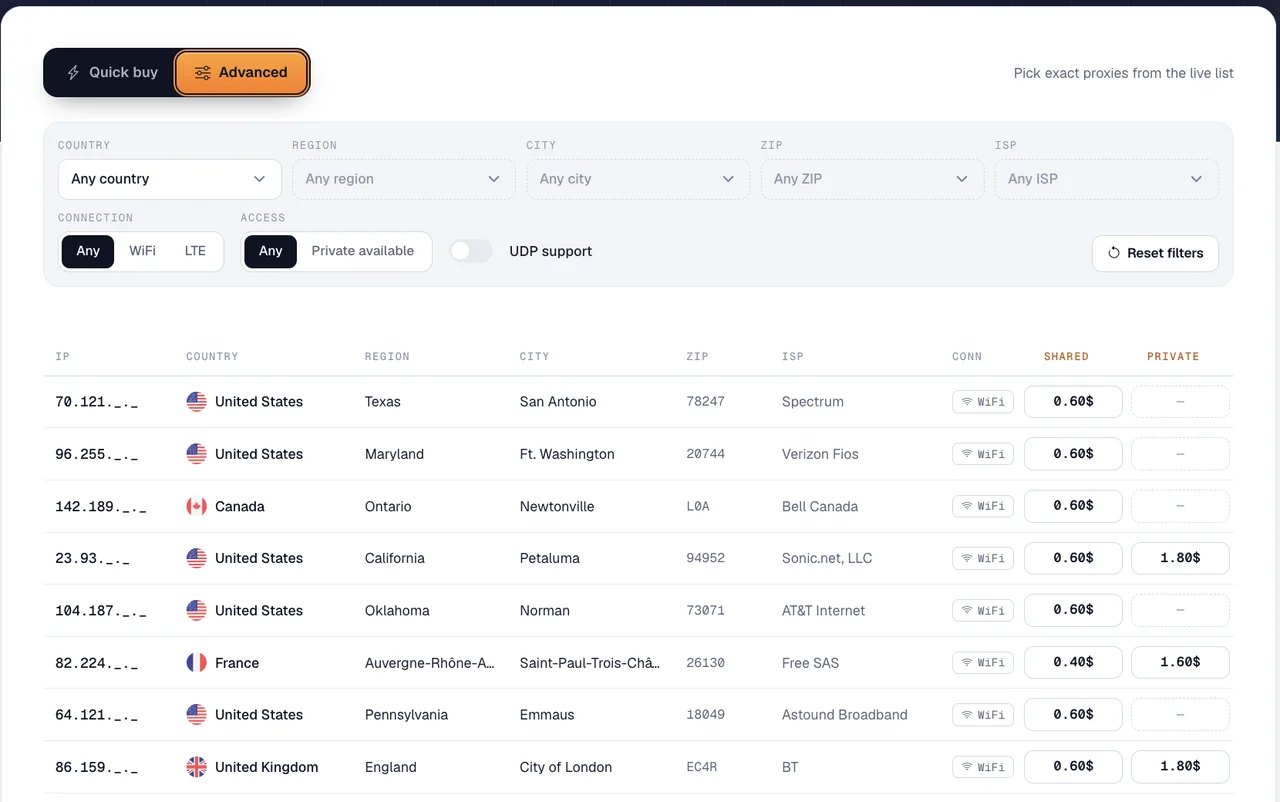
There are two ways to buy. Quick buy takes the country, then region, city, ISP and ZIP, the connection (WiFi or LTE), a UDP filter and the access type, and the service picks a matching proxy for you. Advanced opens the live list: every address on sale with a masked IP, its city, ZIP, ISP, connection and its own day price, and you buy that exact line.
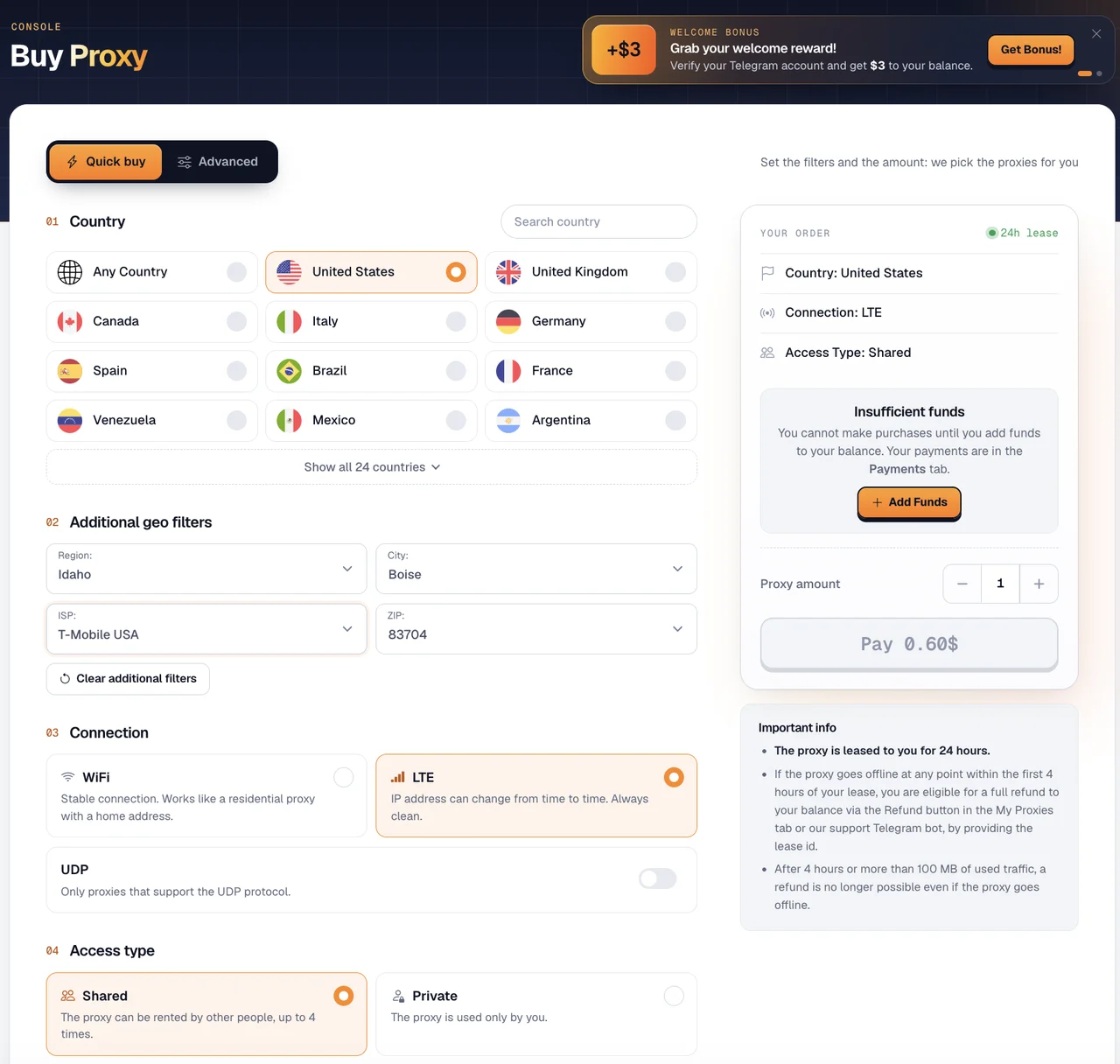
Shared and personal differ in who else sits behind the same IP. A shared proxy can be rented by up to 4 people at the same time, and their behavior lands on the address you are working from. Personal costs more, is yours for the day, and is not offered on every address: in the live list some lines carry only a shared price.
The price depends mostly on the country. In the list we checked in October 2026, a shared day cost $0.40 in France, Italy and Puerto Rico and $0.60 in the US, Canada and the UK, and a personal day cost $1.00 to $1.80.
When a day of unlimited traffic beats paying per gigabyte
The model turns on one question: how many megabytes does your task push through a single address in a day? Below the break-even point you are paying a day rate for a trickle of requests. Above it, the meter stops mattering.
By our catalog, rotating residential traffic has a median of $3.90 per GB on the smallest package and $1.75 per GB on the cheapest volume step. Rotating mobile traffic sits higher, at a median of $5.50 per GB at entry.
A shared address at $0.4 a day therefore pays for itself at roughly 100 MB against the entry price per gigabyte, and at roughly 230 MB against the best volume step. Measured against mobile traffic, the threshold drops to about 73 MB.
A personal address at $1 needs more work to justify: around 256 MB a day to beat the entry price, around 570 MB to beat the cheapest step.
| Compared with (median of our catalog) | Price | Shared IP at $0.4/day pays off above | Personal IP at $1/day pays off above |
|---|---|---|---|
| Rotating residential, smallest package | $3.90/GB | ~100 MB a day | ~256 MB a day |
| Rotating residential, cheapest volume step | $1.75/GB | ~230 MB a day | ~570 MB a day |
| Rotating mobile, smallest package | $5.50/GB | ~73 MB a day | ~182 MB a day |
These thresholds use the lowest day prices. A US address at $0.60 shared or $1.80 personal needs 1.5 and 1.8 times as much daily traffic to pay off.
Translate that into tasks. A profile that watches video, uploads creatives or loads a media-heavy app can push 1 GB in one session, and that day costs $0.4 here against about $3.90 at the median entry price per gigabyte. Pulling one search page from one city does not: a few hundred kilobytes, and the day rate is pure overhead.
When it beats a static IP or a mobile port, and when it does not
Stretch the day rate across a month and the picture flips. Thirty days of a shared address is $12 and a personal one is $30, while static ISP addresses in our catalog start at a median of $4 per IP a month. For an account that has to live on one address for months, the ISP route is the right buy, and our ISP provider rating is where to pick one.
The catch is what an ISP address is: a provider block parked in a data center, static by design, and often used by other customers before you. What you get here is a real home line with a real carrier and a real ZIP behind it, for as long as that line stays up.
Mobile is the other comparison. A dedicated mobile port runs a median of $50 a month in our catalog, so if you need a carrier address in one city for two or three days, paying by the day closes the task without a monthly subscription. Our per port versus per GB breakdown covers that choice, and 1-day mobile rentals covers who else sells time this short.
The standard advice says account work needs a static IP, full stop. We disagree for short tasks. An ISP range looks clean, but it is still a resold hosting-adjacent block, and an anti-bot system that scores ASN reputation can tell which blocks those are. A home line in the right city, held for a day, looks like what it is. You trade stability, not trust.
The risk you are paying for: IPs that drop
You are renting somebody else's connection. The router gets unplugged, the phone leaves the network, the LTE carrier reassigns the address the way it does for any subscriber, and your proxy is gone before the day is over. Nobody can promise otherwise, and the provider does not.
The refund rule is where this turns into money. Funds go back to your balance only if both conditions hold at the same time: the proxy went offline less than 4 hours after the purchase and less than 100 MB went through it. The refund is the Refund button in My Proxies, or the lease ID sent to the support Telegram bot. Past either line, a dead address is your loss.
So the first minutes of the day are the cheap part. Check the address before you load it up:
- confirm country, city and carrier, then open the actual target site, not a generic IP checker
- do all of that inside the refund window, before heavy traffic starts
- take a personal address for anything tied to a login, so four strangers are not sharing your IP
- keep balance in reserve, because a replacement is a new purchase and not a swap
- do not anchor a long-lived account to an address like this for weeks
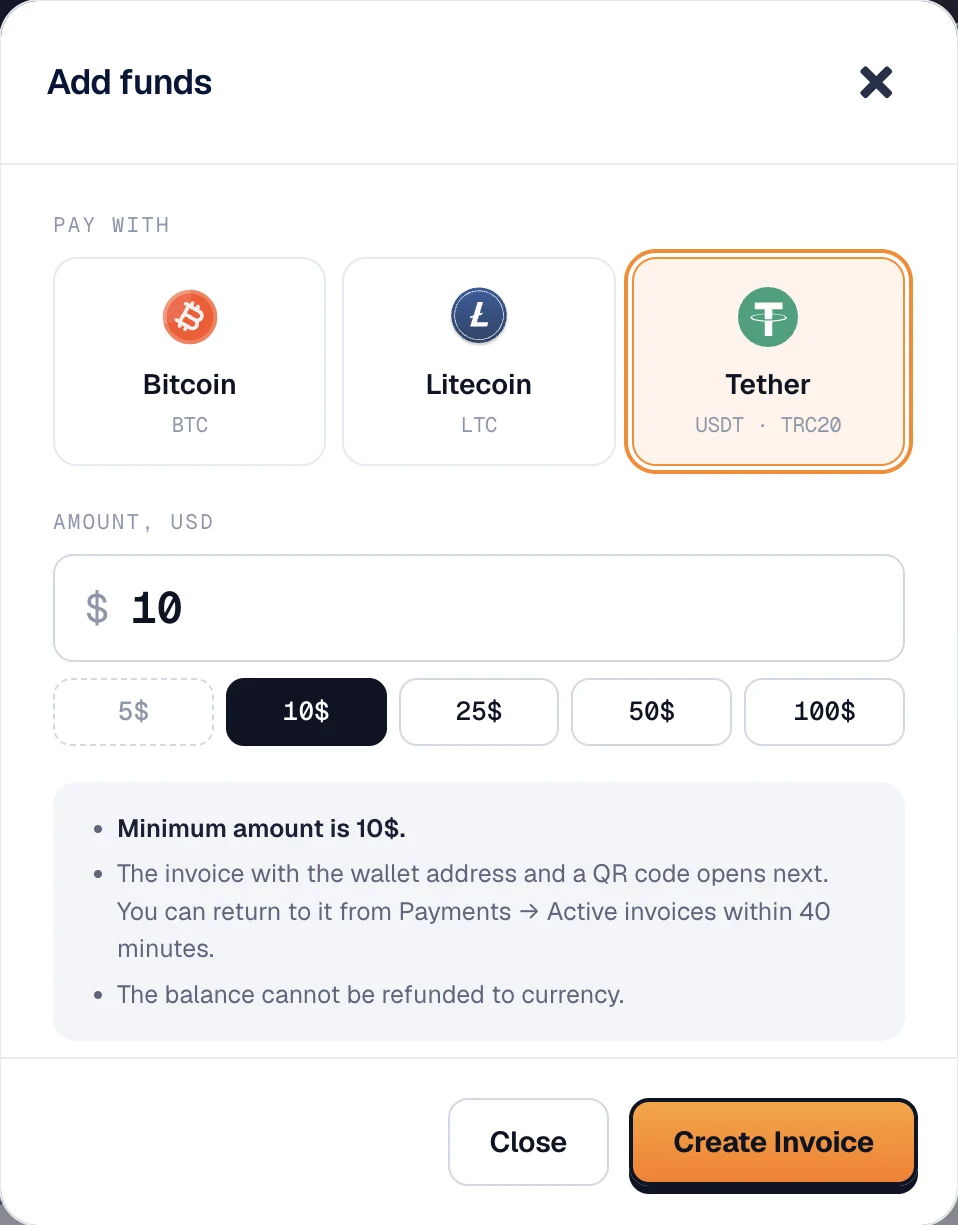
Every purchase and every refund goes through an internal balance. You top it up with Bitcoin, Litecoin or USDT TRC20 (at least $10 for USDT), the service issues an invoice with a wallet address and a QR code, and the invoice stays open for 40 minutes. The balance cannot be withdrawn back to money, so a refunded day can only be spent on another proxy. Top up what you plan to use, not more.
Who should use it
Ad and SERP verification in a named city gets the most out of this model. You pick the carrier and the ZIP, run the checks for a day or two, and pay per address instead of per gigabyte of screenshots.
Registration and warm-up from a chosen location is the second fit, specifically when the session is heavy: video, feeds, uploads. One-off heavy sessions are the third, including testing your own app on a real mobile line.
The fourth case is less common. Only SOCKS5 is offered, and the purchase filter can narrow results to proxies that pass UDP. Calls, messengers, real-time video, game clients, DNS and anything on HTTP/3 ride UDP, and a TCP-only SOCKS5 endpoint either breaks them or quietly lets them leak around the proxy. Our SOCKS5 and HTTPS comparison explains what the protocol carries.
Now the other side. Mass collection does not work at these prices: 10 addresses for a day is $4 shared, and 1,000 addresses is $400, where a traffic-billed pool charges you for bandwidth alone. For that job, start from our rotating residential rating.
Skip it too if an account must sit on one IP for months, if you need rotation on demand (there is none, and an LTE address may rotate when it feels like it), or if your team pays by card. Payment is crypto only.
Verdict
Buy it when the task is short, the traffic is heavy, and the address has to be a genuine home or mobile line in a specific city. That combination is where a day rental is cheaper than a gigabyte and faster than waiting out a monthly plan.
Start small. The $3 bonus for a confirmed Telegram account covers a first shared address with change left, and a single $0.4 purchase is enough to see whether the city, the carrier and your target site behave. Verify inside the refund window every time, not once.
Avoid it for scraping at scale and for long-term account anchoring. The service is young, founded in 2025, and support runs over email and Telegram. Price it as a day rental, not as infrastructure.
Promo code CAPROXY3 adds a 3% bonus to balance top-ups.Visit Website Socks.Market
FAQ
- How is this different from rotating proxies billed per gigabyte?
- You pick one address and keep it for 24 hours with no traffic limit, from $0.4 a day shared and $1 a day personal. A rotating pool changes the IP for you and charges for bandwidth instead.
- Are these static proxies?
- Static for 24 hours, not for a month. Each address is rented by the day from a pool of live home and mobile devices, so it is not an ISP range parked in a data center. A WiFi address is the more stable of the two, and an LTE address can change on its own, the way a phone address does.
- What happens if the IP drops before the day ends?
- Money is returned to your balance only if the proxy goes offline within 4 hours of the purchase and less than 100 MB went through it. Press Refund in My Proxies or send the lease ID to the support Telegram bot. Outside those two conditions, a dropped address is not compensated.
- What does the price depend on?
- Mostly the country. Shared access costs $0.40 to $0.60 per day, with US addresses at the top, and can be rented by up to 4 people at once. Personal access costs $1.00 to $1.80 per day and is not offered on every address.
- Shared or personal, which should I take?
- Shared is fine for checking ads, prices and search results. Take personal for anything tied to a login, so that nobody else's behavior lands on your address.
- Can I change the IP on demand?
- No. To get another address you buy another address. An LTE proxy may change its IP by itself over time, which is normal for a mobile line but not a rotation control you operate.
- Is UDP supported?
- Yes. Only SOCKS5 is offered, and at purchase you can filter for proxies that pass UDP. You need that for calls and messengers, real-time video, game clients, DNS and apps on HTTP/3, since a TCP-only endpoint breaks them or lets them bypass the proxy.
- Which countries are available?
- 24: United States, United Kingdom, Canada, Italy, Germany, Spain, Brazil, France, Venezuela, Mexico, Argentina, India, Jamaica, Dominican Republic, Ireland, Australia, Austria, Ecuador, Puerto Rico, Colombia, Trinidad and Tobago, Barbados, Turkey, Honduras.
- How do I pay, and is there anything to try it with?
- Bitcoin, Litecoin and USDT TRC20, with a minimum top-up of $5 for BTC and LTC and $10 for USDT. The balance cannot be withdrawn back to money. New users get a $3 bonus after confirming Telegram, and that promotion can end at any time. Support is available over email and Telegram.